

Budget allocation

Is the MMM PowerPoint deck dead? No, but it's not what it used to be.
For decades, a presentation was the main way many stakeholders experienced a marketing mix model. Today, I see four interfaces to MMM: 1. Dashboards and planning tools, 2. Configuration tools, 3. MCP and API connections for AI, and 4. PowerPoint decks.
Each interface serves a different audience and has a different purpose as an interface to MMM. The people operating campaigns, maintaining the model, and approving the overall budget need different ways to work with the same evidence.
What are the four interfaces to modern MMM?
Modern MMM has four complementary interfaces. Marketing teams use dashboards and planning tools to explore results and act. Analytics teams use configuration tools to maintain data and model quality. AI applications use MCP or APIs to access measurement and planning capabilities. Senior stakeholders use presentations to review findings and make decisions.
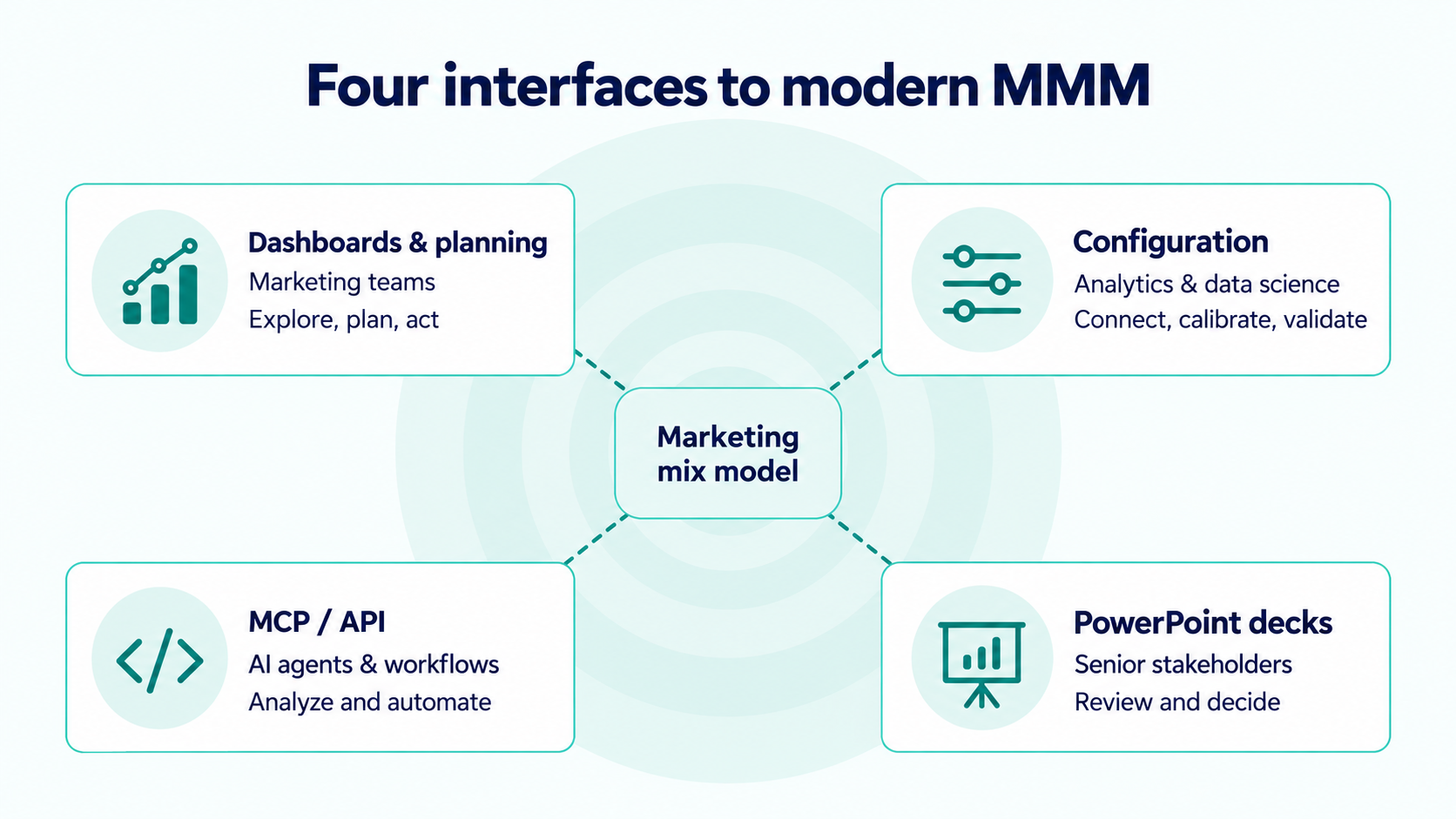
| Interface | Primary users | Main job |
|---|---|---|
| Dashboards, planning and actioning tools | Marketing teams and agencies | Understand performance, compare plans, implement changes |
| Configuration tools | Marketing analytics and data science teams | Maintain data, calibration and model quality |
| MCP / API | AI applications, agents and workflow builders | Use MMM capabilities within connected workflows |
| PowerPoint decks | Senior stakeholders and budget owners | Review the evidence and agree on decisions |
Each interface provides access to the underlying model, which estimates marketing's contribution to business outcomes. Its outputs can include incremental sales, return on advertising spend, response curves, and forecasts. The interface determines who can use those outputs and how.
1. Dashboards, planning and actioning tools for marketing teams
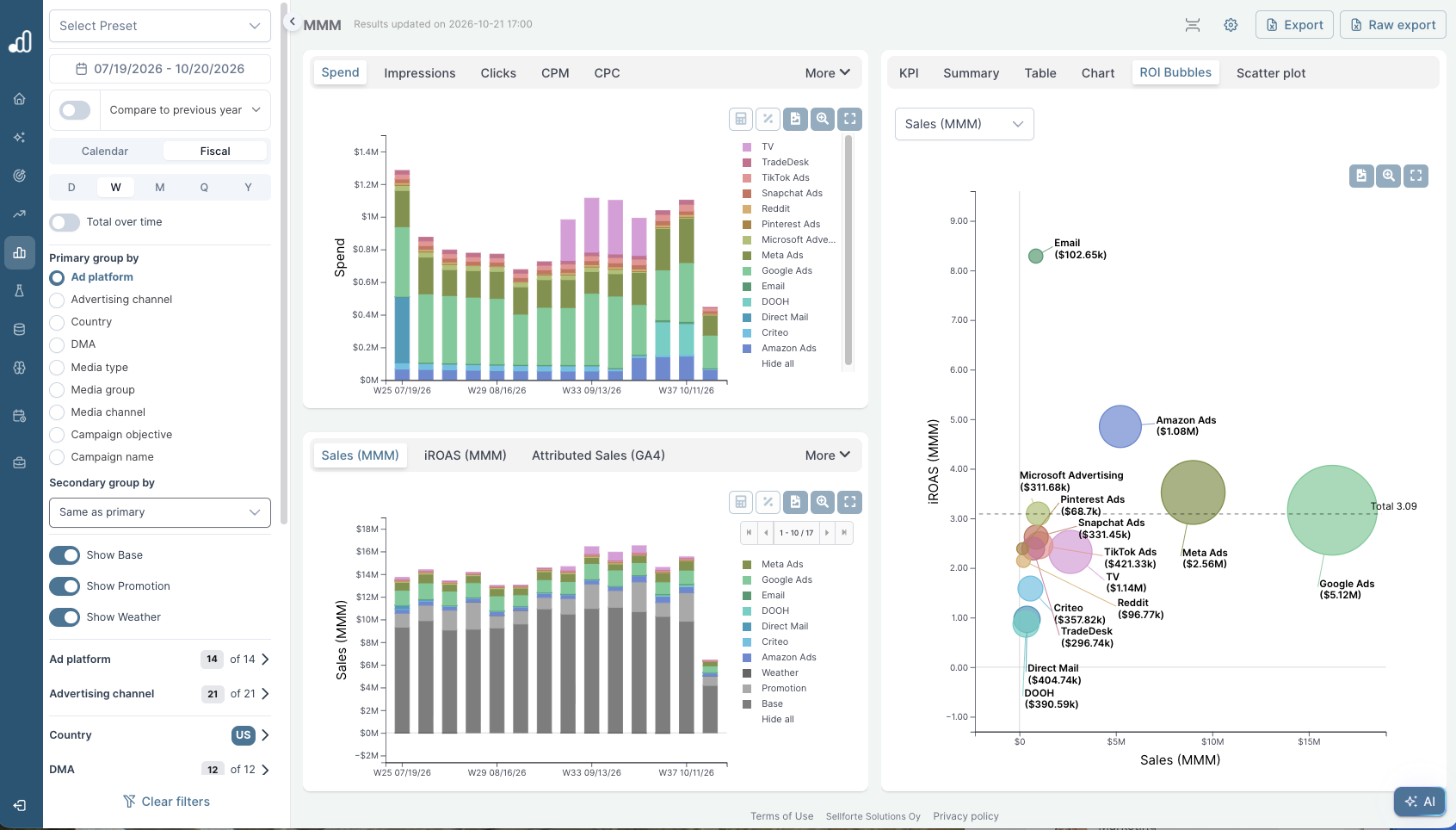
Hands-on marketing teams need to move between understanding performance and deciding what to change. A useful MMM dashboard lets them inspect results by channel, market, campaign, or period at the level the model supports. They can investigate a change in performance without commissioning a new presentation for every question.
Planning tools take that work forward. A team can compare the current media plan with alternatives, adjust the total budget, and see the estimated effect of reallocating spend. Advertising response curves help explain why a channel's historical average return is not enough to decide where the next euro should go. Marginal incremental ROAS (miROAS) focuses on the estimated incremental revenue from an additional unit of spend.
The planning interface also needs to reflect the constraints people actually work with. If awareness and performance have separate budget allocations, the planning tool needs to respect those limits. Marketers should be able to rerun scenarios with their actual budgets and compare options they can implement.
That is a practical test for MMM budget planning tools: can the team express its commitments, spending limits, and channel restrictions, then compare feasible alternatives? The scenario should make its objective and assumptions visible, including the outcome being optimized.
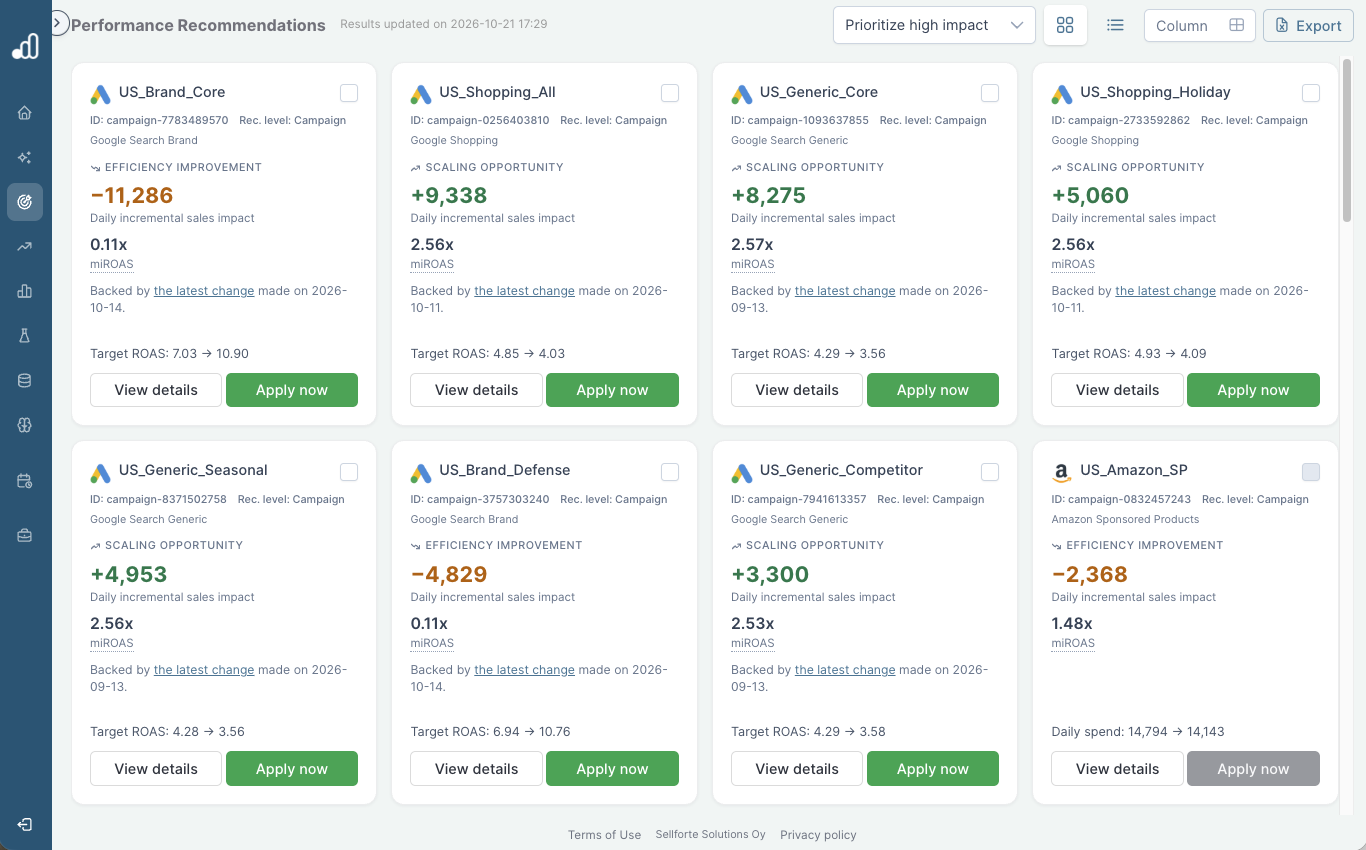
Actioning tools complete the connection to execution. Depending on the available integrations, marketers can export an agreed plan or apply approved spend and bidding changes to advertising platforms. The workflow should make it clear which changes have been implemented and which remain recommendations.
2. Configuration tools for analytics and data science teams
A marketing mix model needs maintenance as the business changes. New channels appear. Campaign naming changes. Data feeds break. An experiment produces new evidence about a channel's incremental effect. Analytics and data science teams need ways to inspect and manage those changes.
This interface includes data connectors, channel mappings, data validation, calibration controls, and model validation. Some organizations expose these through a graphical interface; others use code or a combination of the two. The requirement is that the people responsible for the model can understand what it is using and investigate problems.
Even a small change in a source system can disrupt modeling. For example, a change to a timestamp field can leave the sales extract with too little history to model. Analysts need to inspect the incoming data, identify the gap, and fetch the affected data again before rerunning the model.
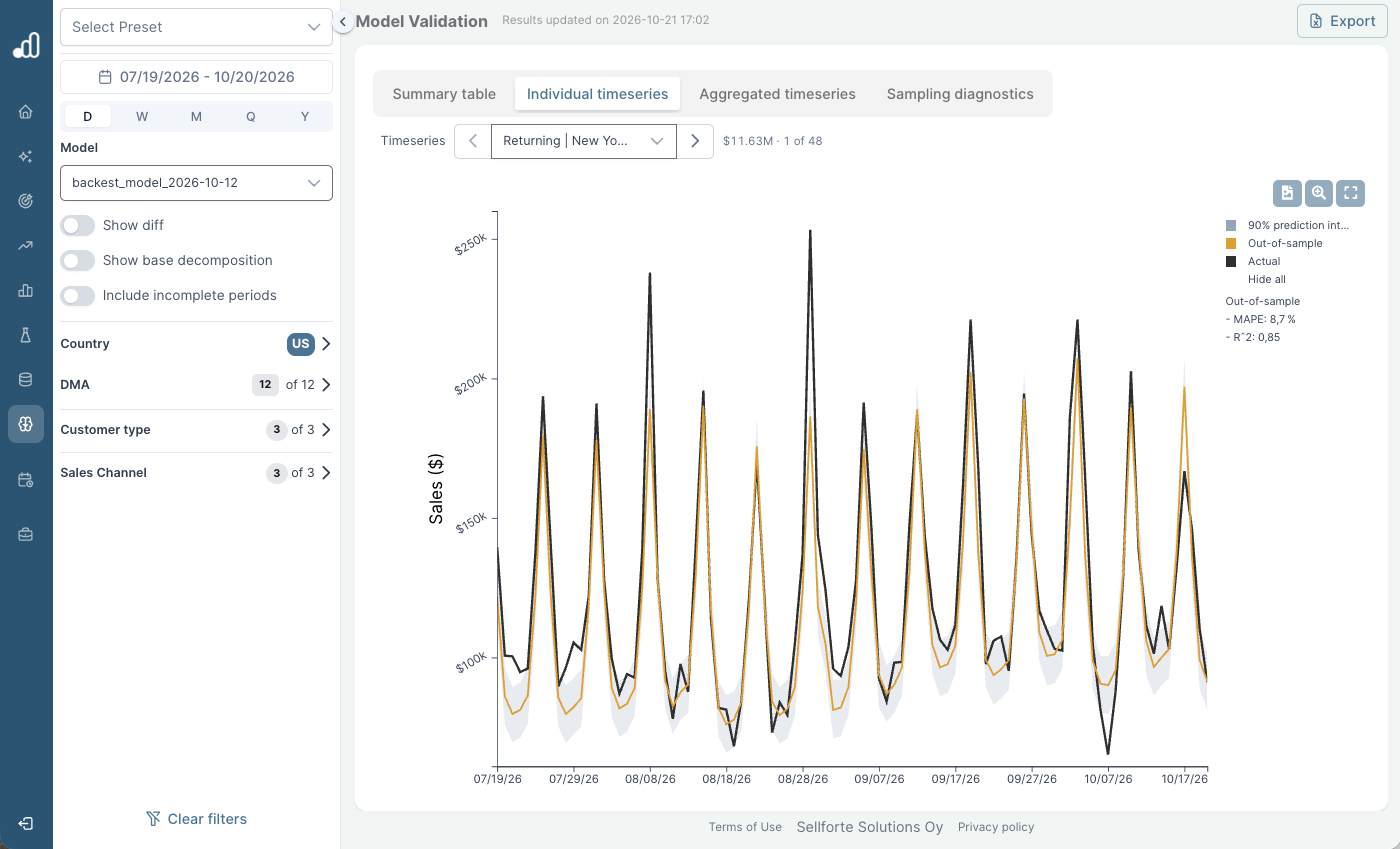
Data validation and model validation answer different questions. Data validation checks whether inputs are complete, consistent, and mapped correctly. Model validation examines whether the model behaves credibly and is suitable for the decisions it will support. Teams also need to understand what changed between model versions.
MMM calibration connects the model to additional evidence, such as incrementality experiments. A usable calibration interface should preserve the test's scope, timing, and uncertainty so that the analytics team can judge how it informs the model. Our guide to experiment libraries and calibration interfaces explores that workflow in more detail.
The marketing team may never open these controls. It still depends on someone doing this work well.
3. MCP and API interfaces for AI agents and workflows
Channel results
Incrementality testing
Budget scenarios
Marginal returns
Revenue forecast
Executive summary
Regional budgets
The third interface lets other software work with MMM. An API gives applications programmatic access to specified data or capabilities. Model Context Protocol (MCP) provides a standardized way for AI applications to connect to external tools and data sources.
For MMM, that can mean asking an AI application to retrieve measurement results, compare periods, or run an available optimizer. A marketer can work through a question in Claude, ChatGPT, or another compatible environment, with the connection and permissions determining which capabilities are available.
A useful request might be: “Compare our current plan with a lower-budget scenario. Keep the existing channel commitments, show the expected change in incremental sales, and explain the largest trade-offs.” The connected model and optimizer supply the measurement and scenario calculations. The AI helps retrieve, interpret, and present them.
Sellforte MCP, for example, makes measurement data and planning capabilities available within compatible AI workflows. Those results can then become inputs to a document, a visualization, or a presentation in the connected environment.
A marketer reviewing monthly results can use AI to check an interpretation, explore a follow-up question, and prepare the findings for an internal presentation. Connecting these steps can reduce the manual work of moving data from a dashboard into Excel and then into PowerPoint.
Connected workflows can also support media optimization: retrieve updated results, identify a potential change, run a constrained scenario, and prepare it for review. Applying the change requires a separate execution capability and the appropriate authorization. Access to MMM through MCP does not, by itself, give an agent permission or the ability to change advertising budgets.
4. PowerPoint decks for senior stakeholders
Many senior stakeholders still prefer a presentation. A quarterly business review needs a shared account of what happened, what the team learned, and which decisions are now required. A deck gives the meeting a structure and leaves participants with something they can revisit or share.
People deciding the overall marketing budget need to understand the recommendation well enough to challenge it. They may ask why returns changed, whether the forecast assumes more favorable trading conditions, or what the business gives up if it reduces spend. The presentation should bring those questions into the discussion.
A table may be useful when you are checking the numbers yourself. For a leadership meeting, a chart with a clear explanation can make the recommendation easier to discuss. AI can help prepare that presentation, while the deck remains the format stakeholders use to review it.
A useful MMM presentation should cover:
- The business question, reporting period, and scope of the analysis.
- The main drivers of performance, separating estimated media effects from other modeled business factors.
- The proposed budget or allocation decision, with feasible alternatives.
- The assumptions and uncertainty that could change the recommendation.
- The agreed actions, owners, and timing of the next review.
A deck is a snapshot. Include the model version or update date, the scenario assumptions, and a route back to the supporting analysis. That makes it easier to answer follow-up questions and avoids presenting an old scenario as the current recommendation.
How the four interfaces work together
Consider an illustrative planning question: the business needs to reduce next quarter's media budget while keeping existing commitments. Several interfaces can contribute to the answer.
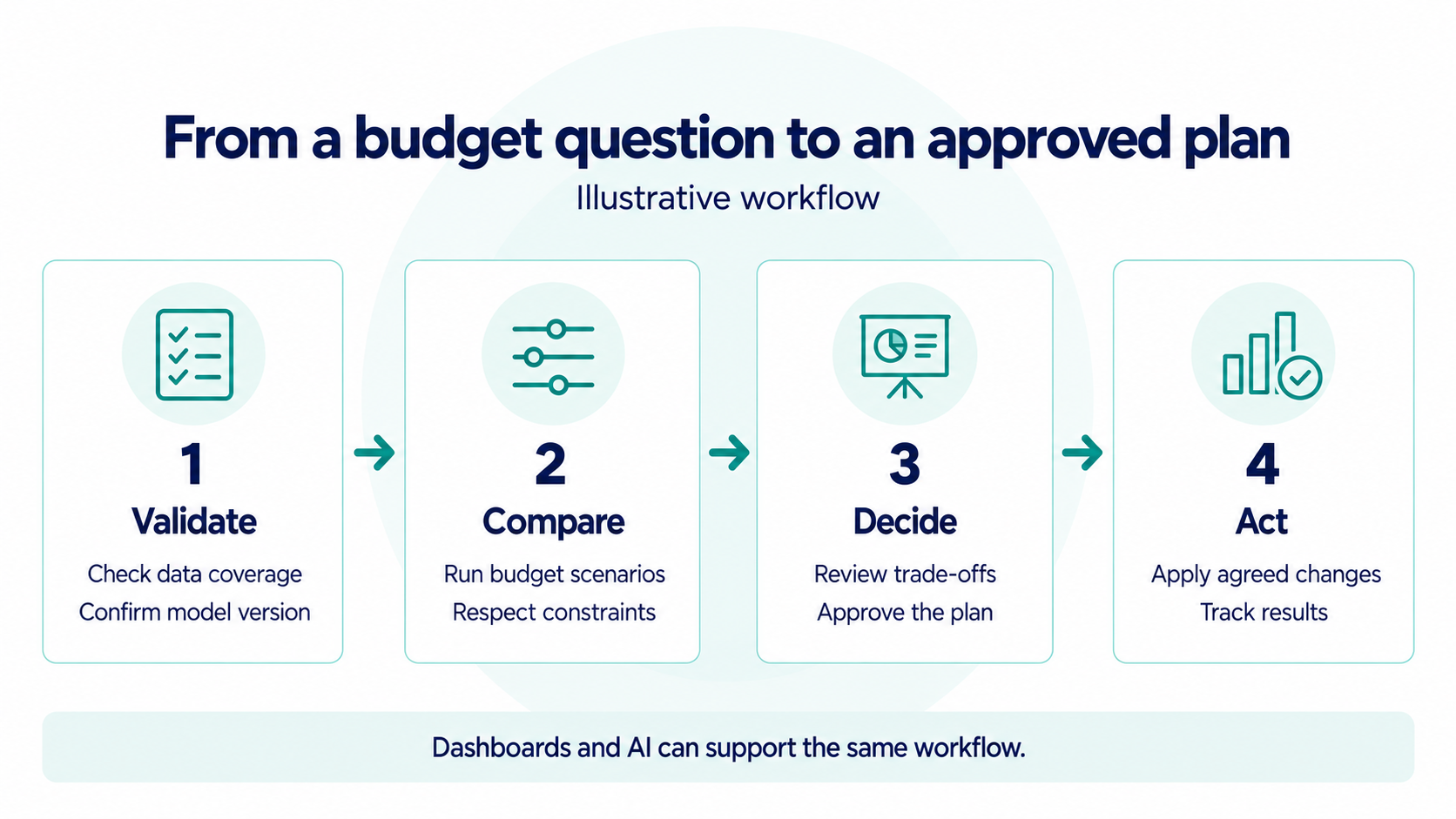
The analytics team checks that the model uses the right data and that the latest changes have been validated. The marketing team then compares feasible scenarios in a planning tool, or asks a connected AI application to run them. Both routes should use consistent definitions, model versions, and constraints.
A presentation brings the options to the budget owner, including the expected effects and the assumptions behind them. Once a plan is agreed, the marketing team implements the changes and follows the results. New evidence can inform the next model update and planning cycle.
This is the practical context for operationalizing MMM. The interfaces should make it easy to carry a question through to a decision, with clear ownership at each step.
When evaluating MMM software, ask the provider to walk through one of your actual budget decisions. Have the marketing team change a constraint. Have an analyst inspect the underlying data and calibration. Check what an AI connection can retrieve or execute. Then ask what the budget owner would receive for the review meeting. That walkthrough reveals more about day-to-day usefulness than a tour of individual screens.
Frequently asked questions
Is a marketing mix modeling dashboard enough?
A dashboard can make results accessible, but teams also need a way to maintain the model, evaluate plans, and implement decisions. Those capabilities may sit in the same product or in connected tools. The required setup depends on who owns each part of the work.
Does an MMM dashboard mean the model updates in real time?
No. The interface, data refresh schedule, and model update schedule are separate. A dashboard or AI assistant may display the latest available results from a model that updates less frequently. Check the data coverage and model date before using an answer for a new decision.
Does AI replace the marketing mix model?
No. In a connected MMM workflow, the model supplies the estimates of marketing impact and the optimizer calculates scenarios. The AI interface helps people access and use those capabilities. Its answers still depend on the underlying data, model quality, and tools it can call.
Should MMM results still be presented in PowerPoint?
Yes, when a presentation suits the audience and decision. PowerPoint is useful for executive reviews and budget discussions. Keep the deck connected to the supporting analysis so that stakeholders can examine the evidence behind the recommendation.
Further Reading and Resources
Explore the measurement, planning, and model maintenance behind the four interfaces.
Putting MMM into everyday decisions
Maintaining the model and its evidence
Exploring the interfaces
About the author

Lauri Potka is the Chief Operating Officer at Sellforte, with over 15 years of experience in Marketing Mix Modeling, marketing measurement and media spend optimization. Before joining Sellforte, he worked as a management consultant at the Boston Consulting Group, advising some of the world’s largest advertisers on marketing optimization. Follow Lauri on LinkedIn.
What is Causal Marketing Mix Modeling (MMM)?

What is Causal Marketing Mix Modeling (MMM)?
Mar 11, 2025
10
min read
What is Marketing Mix Modeling (MMM)? A Complete Guide for Marketers
What is Marketing Mix Modeling (MMM)? A Complete Guide for Marketers
Feb 13, 2025
20
min read
Meridian vs. Sellforte MMM SaaS: The Complete Comparison for 2026
Meridian vs. Sellforte MMM SaaS: The Complete Comparison for 2026
Oct 16, 2025
16
min read


