

A/B test results
Sellforte A/B Tests
Measure the incremental sales impact of catalogs and owned media
Find out whether catalog mailings, email campaigns, and other owned media generate additional sales. Upload your test and control data, measure the effect, and use the result to plan your next campaign.
Part of Sellforte Incrementality Testing. Available without MMM.
Loading Sellforte A/B Tests…Open the full demo ↗
Measure what your campaign added
Test catalogs, email, and other owned media
Customers can buy after receiving a catalog or email even when they would have bought without it. A holdout gives you a comparison for the sales your activity added.
Run your campaign with a clearly separated control group, then bring the results into Sellforte.
Test groupReceives the catalog
● ● ●
● ● ●
● ● ●
Control groupHeld out from the mailing
● ● ●
● ● ●
● ● ●
Compare sales using a clear treatment split and pre-campaign history.
Analyze the sales effect over time
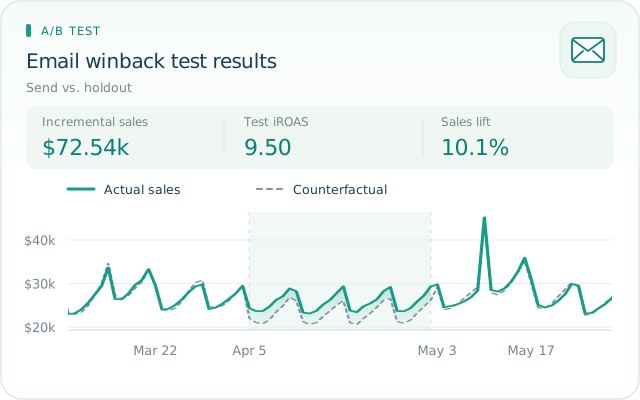
Sellforte uses Bayesian synthetic control to estimate what would have happened without the campaign. It learns from the test and control groups before treatment, then compares actual sales with that counterfactual.
See when the effect appears and how it accumulates during the measurement window.
Bring your test and control data into Sellforte
Upload the data from your own experiment
Use groups that fit the test: customer segments, store tiers, product categories, or geographies. Upload KPI data by date with test_ and control_ columns. Add media spend when you want a return calculation.
CSV, JSON, XLS, and XLSX are supported. Download the templates from the setup screen to prepare your files.
↑
KPI dataRequired · Sales or another outcome
Uploaded↑
Media dataOptional · Spend for the return calculation
Uploaded| date | test_send | control_holdout |
|---|---|---|
| 2026-03-01 | 1243.5 | 1176.2 |
| 2026-03-02 | 1302.0 | 1221.6 |
Illustrative rows. Include history before the campaign as well as the measurement period.
Give the model a useful comparison period
Historical data shows how the groups behaved before the campaign. The control groups should be able to reproduce that pattern and remain unaffected by the treatment.
Set the campaign dates and include a cool-down when purchases arrive after the activity ends. Review the historical fit before using the result to make a decision.
- Experiment
- Catalog mailing · Send vs. holdout
- Treatment start
- April 1
- Treatment end
- April 28
- Group definition
- Customers who received the catalog and a separate holdout
Pre-treatment
Learn the baselineTreatment
Measure the changeCool-down
Capture delayed effects
Learn the baselineTreatment
Measure the changeCool-down
Capture delayed effects
Choose dates to match your campaign and purchase cycle.
Use the result to plan your next campaign
Read the return alongside its uncertainty
Review incremental sales and the range of plausible outcomes. When spend is included, test iROAS relates the incremental revenue to the incremental investment.
Compare the result with campaign costs and margins before expanding the activity. A return measured for one audience and period does not establish the same return for a larger rollout.
Test iROAS9.50
90% credible interval8.87–10.12
Simulated email test result. The curve illustrates the interval shown in the product tour.
Refine the next mailing
Use the evidence to decide whether to repeat a catalog campaign and which audience question to test next.
Evaluate owned media
Assess the sales added by a winback email or another controlled campaign, alongside the resources it takes to run.
Follow up on uncertainty
An inconclusive result leaves the question open. Review the control groups and campaign execution before planning another test.
Keep the learning after the test ends
Compare A/B tests with other test types in your test library
Keep your A/B tests alongside Geo Tests and Conversion Lift Studies. Revisit the design, results, and AI summary when the next campaign decision comes up.
Filter the library to find relevant studies, and use comments to record the interpretation and next action. When comparing results, check the audience, activity, period, and spend definition.
| Test | Spend | iROAS | Confidence |
|---|---|---|---|
| Meta Cart RetargetingConversion Lift · United States | $61.11k | 5.01 | 96% |
| Meta + Google go-darkGeo test · United States | $1.08M | 5.06 | 100% |
| Email winback pushA/B Test · United States | $7.63k | 9.50 | 100% |
| Meta full-funnelConversion Lift · United States | $350.41k | 3.14 | 98% |
| Meta ProspectingConversion Lift · United States | $360.61k | 2.65 | 95% |
Simulated examples. Compare scope and definitions before comparing returns.
Bring A/B testing into your own AI workflows
Test uncertainty
You
How strong is this A/B test?
AI •••
Review the effect estimate and its credible interval.
Campaign comparison
You
How do our email and catalog tests compare?
AI •••
Compare the audiences, spend, and test periods.
Next A/B test
You
What should we test next?
AI •••
Use previous findings to plan the next holdout.
Wider measurement
You
How does this compare with our MMM?
AI •••
Check that both estimates cover the same activity.
Campaign spend
You
Did spend change as planned?
AI •••
Review campaign spend during the test window.
A/B test report
You
Summarize this A/B test.
AI •••
Here is a readout of the effect and its uncertainty.
Campaign context
You
Could a promotion have affected the result?
AI •••
Review the test alongside your campaign brief.
Create reports from your A/B tests
Use your own AI tools to turn the results into presentations and team readouts. Bring the effect estimate and uncertainty into the discussion, with experiment evidence available through Sellforte MCP.
Build A/B test analysis agents
Give your AI agents access to your test library to compare completed studies and summarize new results. Use the findings to prepare follow-up questions for your team.
Compare with your wider measurement
Bring experiment findings together with MMM, attribution, and other data available to your AI. Compare the same activity and period to investigate agreement or differences.
Add campaign context
Combine test results with campaign briefs, mailing costs, promotions, and audience definitions. Give your AI the context to explain the finding and prepare the next decision.
A/B Tests FAQs
What is an A/B Test in Sellforte?
It analyzes an experiment using uploaded test and control data. Sellforte estimates the incremental effect with Bayesian synthetic control, using the same methodology as Geo Tests.
Can I measure catalog mailings and email campaigns?
Yes. Run the activity with a separate holdout and upload performance history for both groups. The result helps you understand how much sales the activity added.
What data do I need for an A/B test?
Upload dated KPI data for test and control groups, covering the pre-treatment and measurement periods. Media data is optional. Read the data requirements.
Can I run an A/B test without spend data?
Yes. You receive an incremental KPI estimate. A return calculation requires corresponding spend data.
How does Sellforte handle multiple test groups?
It combines uploaded test groups into one result by default. Analyze distinct segments separately when you need a segment-specific result. See the A/B test setup guide.
Can I use A/B Tests without MMM?
Yes. A/B Tests are included in the standalone Incrementality Testing product. Compare the plans.
Plan your next A/B test with Sellforte
Bring a campaign question and explore how to measure its incremental sales impact.