MMM Use Case

To find campaigns and ad sets worth scaling, open Performance → Recommendations and compare the suggested changes alongside their expected incremental sales impact and marginal incremental ROAS (miROAS). Open the strongest candidates to check the current settings, recommended settings and extra daily spend.
This walkthrough uses simulated data from the public Sellforte demo. Country is US, and the recommendations use November 9–15, 2026. The figures describe this example; your recommendations will change as new results arrive.
Before you start: Campaign or ad set recommendations, a market selection, and the return requirement used by your business.
What you will produce: A shortlist of specific bid or budget changes to review, with their projected sales impact and spending requirement.
1. Start with the opportunities that can move the result
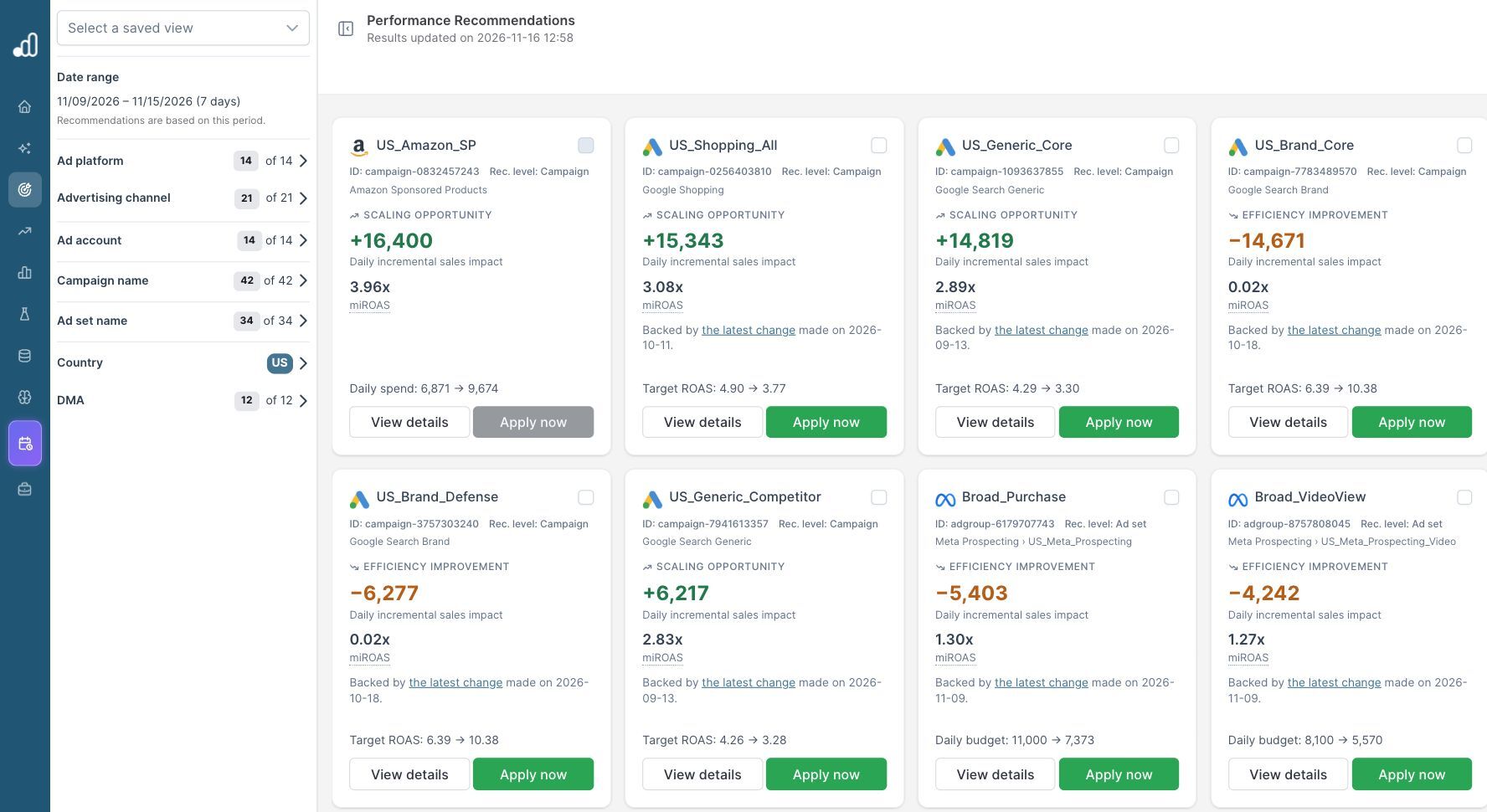
Keep the sort order on Prioritize high impact. The cards show the campaign or ad set name, its advertising channel, recommendation level, daily incremental sales impact and miROAS. A Scaling opportunity indicates a suggested increase in activity. An Efficiency improvement can recommend reducing spend.
The sort order can bring both types to the top. Read the recommendation label and the sign of the sales impact before making your shortlist. A large negative sales figure on a spending reduction is a trade-off to evaluate alongside the money saved.
2. Compare the proposed actions at the right level
| Campaign or ad set | Level | Suggested setting | Daily incremental sales impact | miROAS shown |
|---|---|---|---|---|
| US_Shopping_All | Campaign | Target ROAS: 4.90 → 3.77 | +$15,343 | 3.08 |
| US_Generic_Core | Campaign | Target ROAS: 4.29 → 3.30 | +$14,819 | 2.89 |
| Broad_Purchase in US_TikTok_Launch | Ad set | Daily budget: $1,200 → $1,533 | +$1,591 | 2.89 |
Shopping and Generic Core have similar projected sales gains, while the TikTok ad set is a smaller opportunity. This gives the team a practical order for review. If the available budget is limited, the amount of extra spend needed becomes part of that comparison.
Check the parent campaign when reading an ad set name. Several platforms in the demo have an ad set called Broad_Purchase. The platform, channel and parent campaign identify the activity you would actually change.
3. Open the recommendation and check the spend requirement
Select View details on US_Shopping_All. The panel recommends decreasing target ROAS from 4.90 to 3.77 and shows the following spending context:
| Field | Demo value |
|---|---|
| Current daily spend | $7,887 |
| Recommended daily spend | $11,468 |
| Daily spend change | +$3,580.52 |
| Spend in the seven-day reference period | $55,211.53 |
| Active days in that period | 7 |
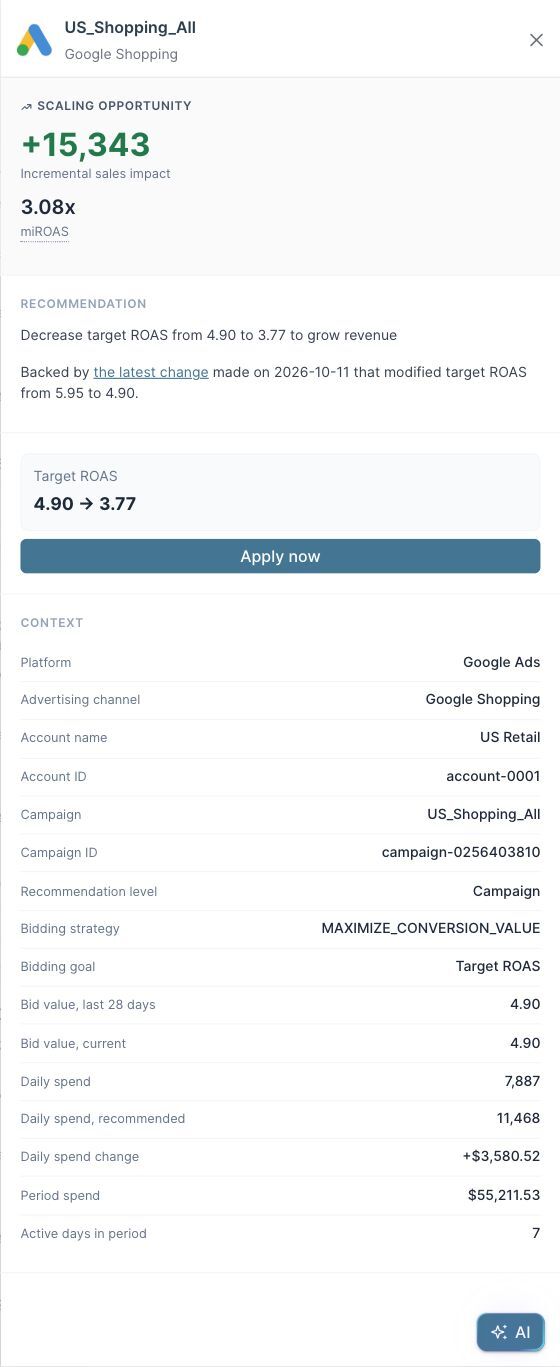
The proposed change would require roughly 45% more daily spend for this campaign. Check that the total budget, stock availability and trading margin support that expansion. The target ROAS value is an ad-platform bidding setting; the miROAS figure measures incremental return. The two serve different purposes.
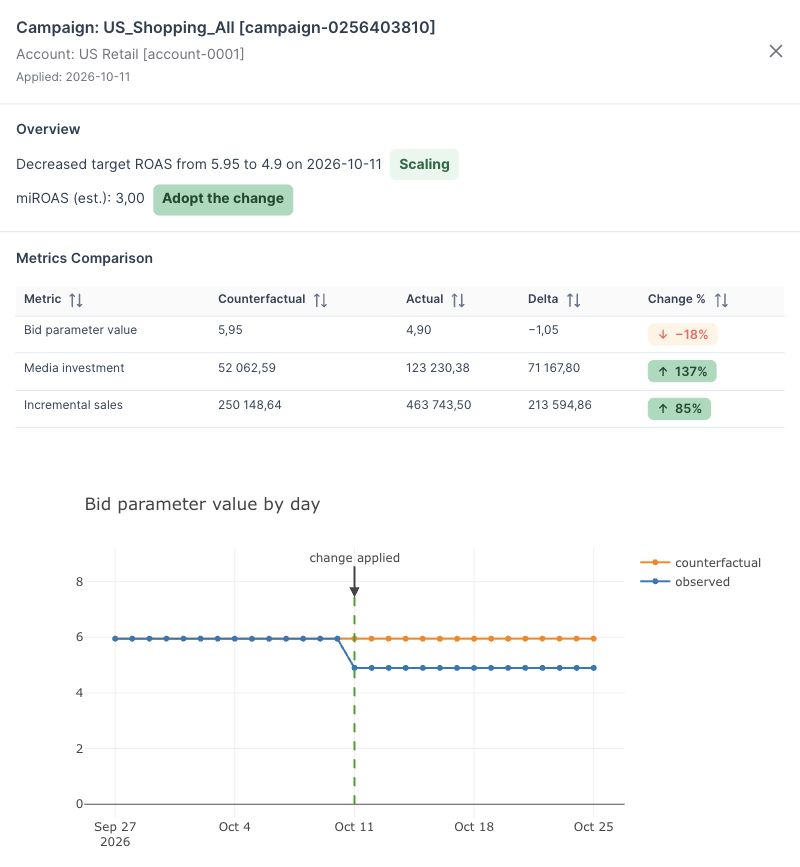
The panel also links to the latest measured change: on October 11, target ROAS moved from 5.95 to 4.90. Follow that link to see what happened after the earlier adjustment. Historical evidence can support the next step, while the recommendation’s sales impact remains a forecast.
4. Choose a change that fits the budget and the business
For this example, US_Shopping_All is a concrete scaling candidate: a named campaign, a proposed target, an expected daily sales gain and an additional spending requirement. Review US_Generic_Core alongside it before committing the available budget. If both would exceed the budget, prioritize the feasible opportunity or use the Media Optimizer to compare allocations.
In an account with activation enabled, review the campaign and setting before using Apply now. Some recommendations, such as the demo’s Amazon spending suggestions, have that control disabled. Those can still inform a change made in the relevant ad platform.
After making an approved adjustment, use Change Intelligence to evaluate its incremental effect. This connects the decision to the extra sales and spend observed after the change, and helps determine whether to retain the new setting.
Further Reading and Resources
Read campaign recommendations
Apply and evaluate the decision
About the author

Lauri Potka is the Chief Operating Officer at Sellforte, with over 15 years of experience in Marketing Mix Modeling, marketing measurement and media spend optimization. Before joining Sellforte, he worked as a management consultant at the Boston Consulting Group, advising some of the world’s largest advertisers on marketing optimization. Follow Lauri on LinkedIn.
How to Compare Media Performance Across Regions
How Do You Tell Whether a Target ROAS Change Paid Off?