
Sellforte MCP

Bring Sellforte’s MMM, experiment data, and planning capabilities into the LLMs and AI workflows where you already work.

Analyze performance, combine Sellforte with other data, run optimizer scenarios when budgets change, and use Sellforte as part of wider AI and agent workflows without beyond the Sellforte UI.

How Sellforte MCP Works

Sellforte MCP makes Sellforte available as a connected capability inside LLMs and AI agents that support MCP.

Connect your Sellforte account, give your AI access to Sellforte’s measurement and planning capabilities, and use them directly inside your existing AI workflow.

Ask questions about past media performance. Combine Sellforte with other connected data sources. Create optimizer scenarios when budgets change. Then use the capabilities of your AI environment to turn those results into presentations, documents, visualizations, and whatever your workflow needs next.

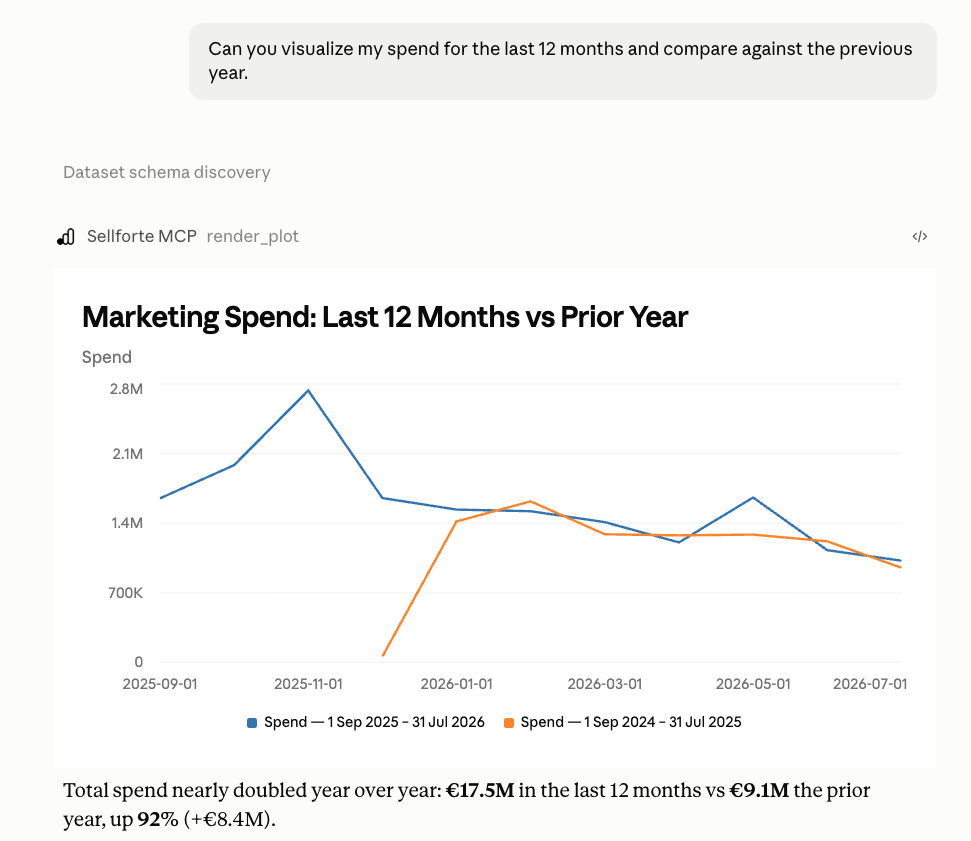
Sellforte MCP Spend

Step 1: Connect Sellforte to Your LLM

Add Sellforte as an MCP connector and authenticate using your existing Sellforte account. Our first implementation works with Claude through Custom Connectors. Once connected, Claude can discover the Sellforte tools and capabilities available to it.

You do not need to configure individual Sellforte APIs or manually move Sellforte data into the conversation. Connect once, then start with a question as simple as, “What can you do with Sellforte?”

Sellforte MCP can be added to any LLM client that supports connecting to MCP servers.
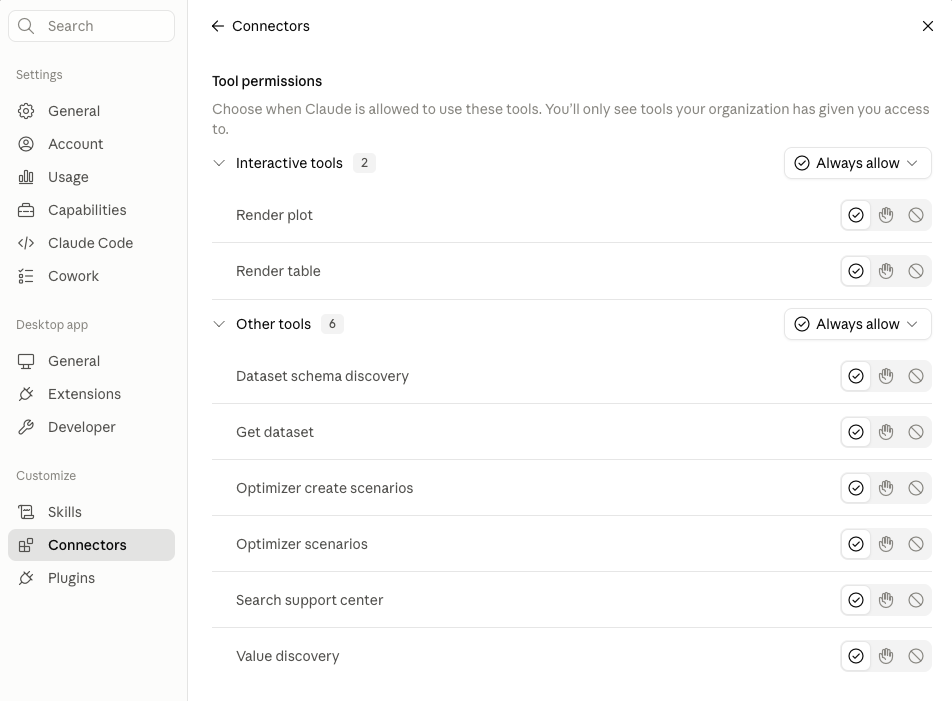
Sellforte MCP Permissions

Step 2: Ask questions using independent measurement

Give your LLM access to the same independent marketing measurement you use inside Sellforte. Ask it to analyze past media performance, compare periods, investigate changes in incremental sales or ROI, or work with the MMM and experiment data available through Sellforte.

The LLM handles the conversation, analysis, and presentation and Sellforte provides the underlying measurement intelligence. That means your AI can reason from incremental business impact rather than relying only on platform-attributed conversions or generic marketing data.
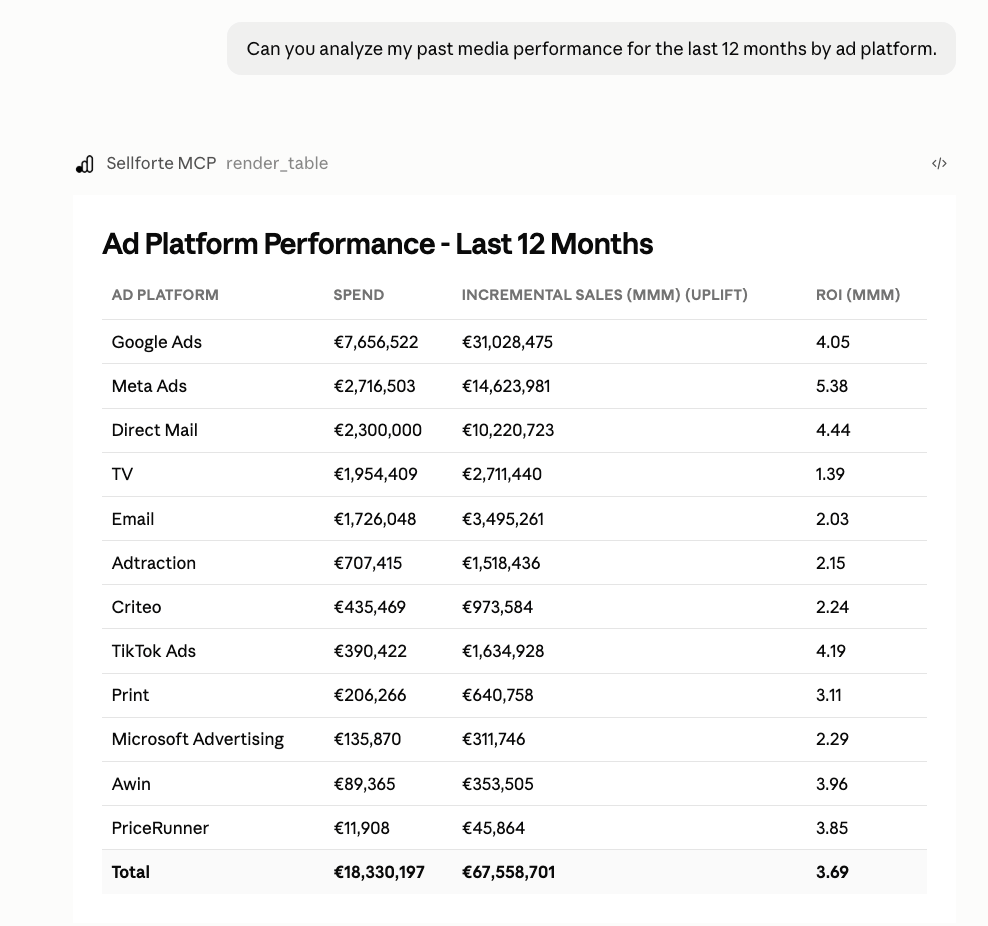
Sellforte MCP Media Analysis

Step 3: Run dynamic scenarios

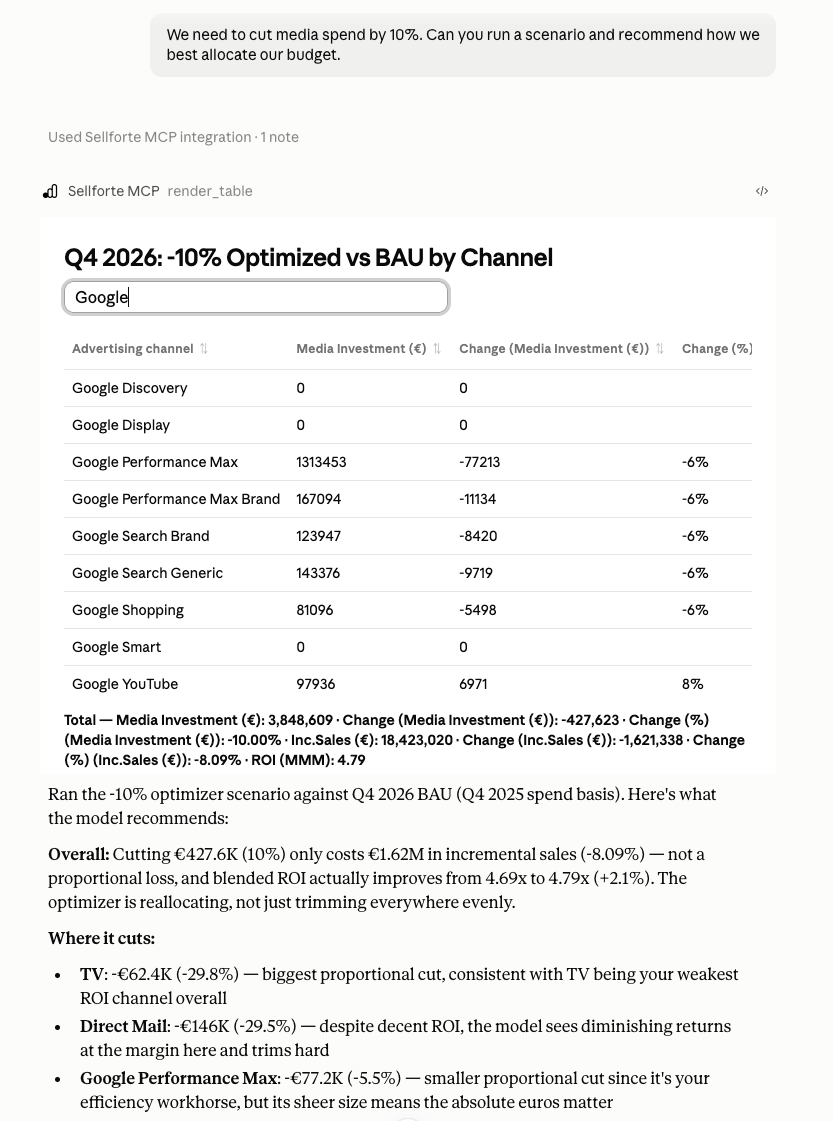
Use Sellforte's optimizer capabilities to respond when budgets or business constraints change. Ask your LLM to run a new scenario for a 10% budget cut, a 5% increase for Q4, or another planning change, and return the recommended allocation based on Sellforte's response curves.

The LLM can then explain where spend should increase or decrease and the expected impact on incremental sales and ROI.

For example, "We need to cut media spend by 10%. Can you run a scenario and recommend how we best allocate our budget."
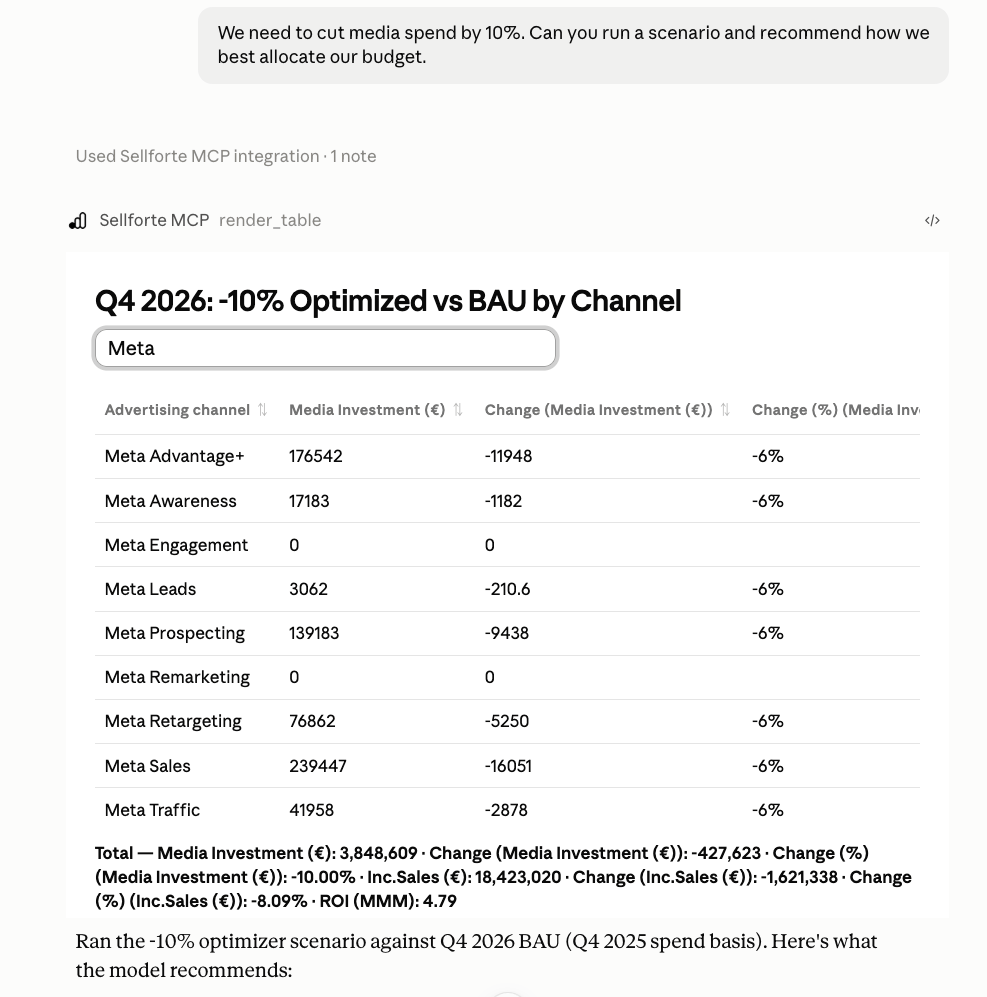
Sellforte MCP Dynamic Scenario

Step 4: Create reports, documents, and presentations

Turn Sellforte analysis and recommendations into the format your next conversation requires. Ask your LLM to create a report, document, presentation, or visualization based on the Sellforte results already in the workflow.

Sellforte provides the measurement and planning intelligence and the LLM turns that intelligence into a finished output you can use with your team or leadership.
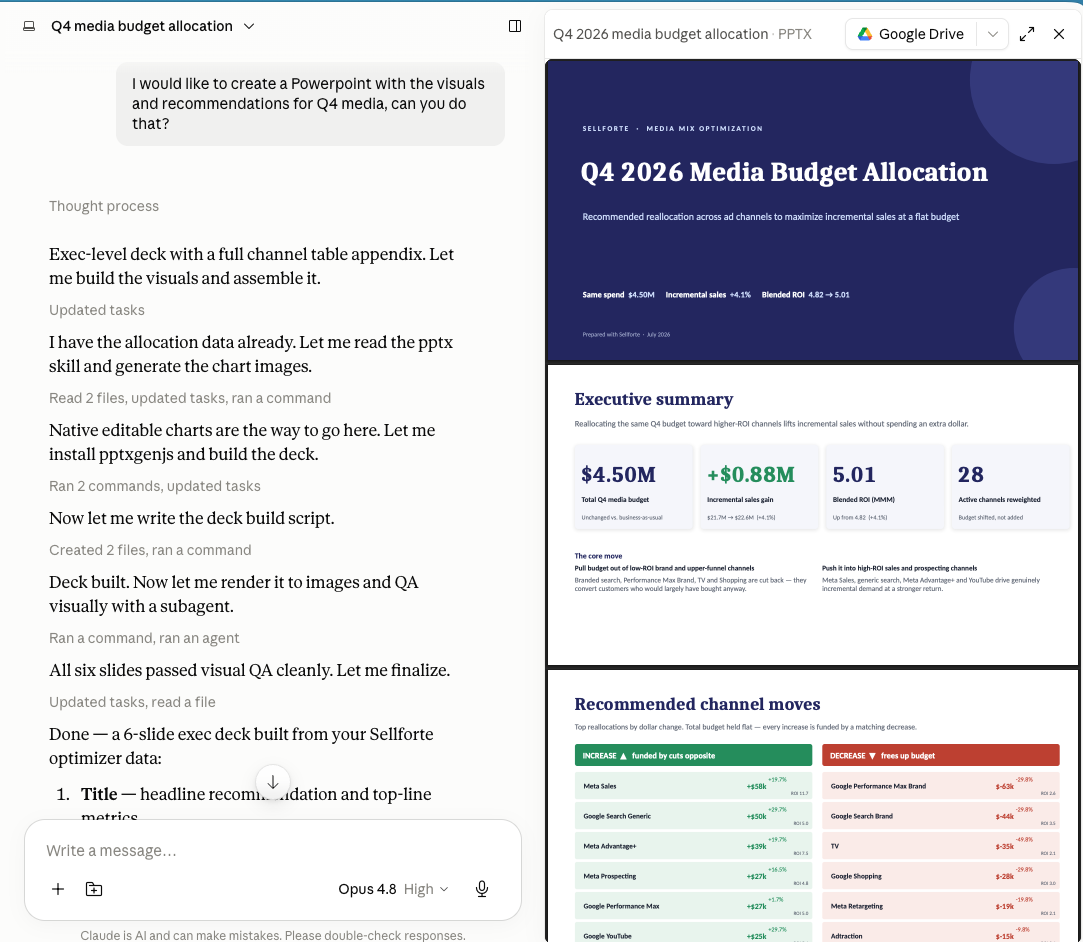
Sellforte MCP Slide Deck

Step 5: Turn recommendations into action

Move from analysis and planning into execution. Use Sellforte recommendations to decide what should change, then apply supported changes through Sellforte Activate or your existing advertising platform workflows.

This connects independent measurement with the day-to-day decisions performance marketers make across their campaigns.
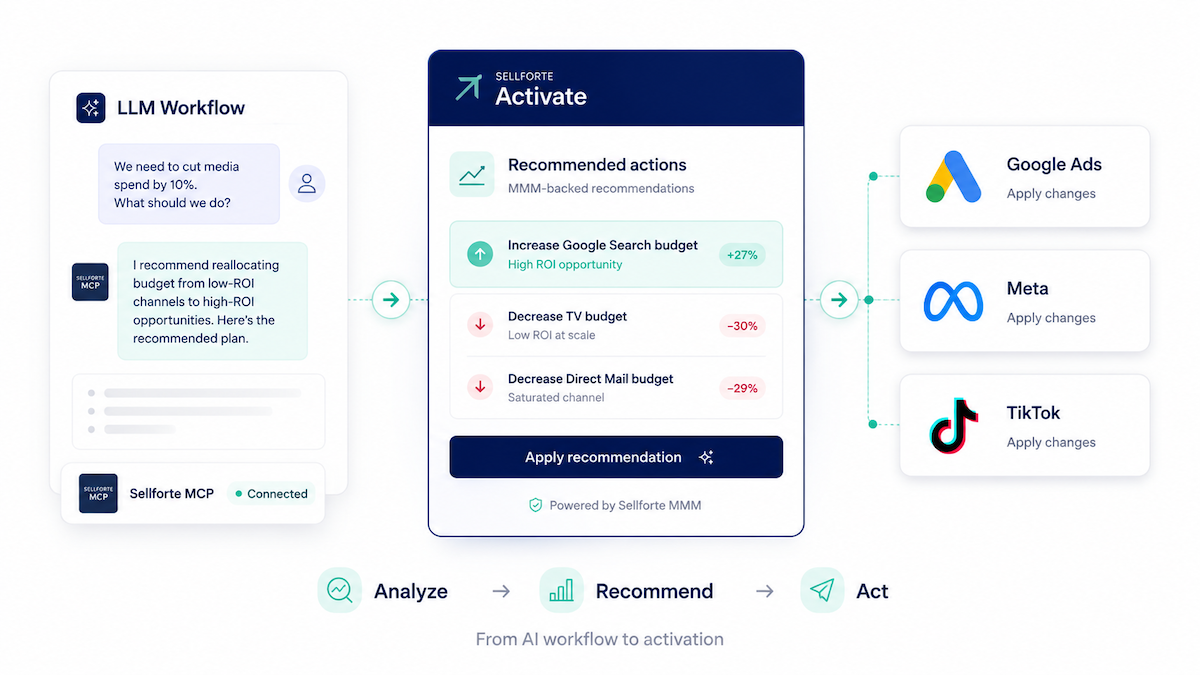
Sellforte MCP to Activate workflow

Step 6: Measure what happened next

Close the loop by measuring the impact of the changes you make. Sellforte Change Intelligence helps you understand what happened after a campaign or bidding change and whether performance moved as expected.

Feed that learning back into your next analysis, scenario, and recommendation.
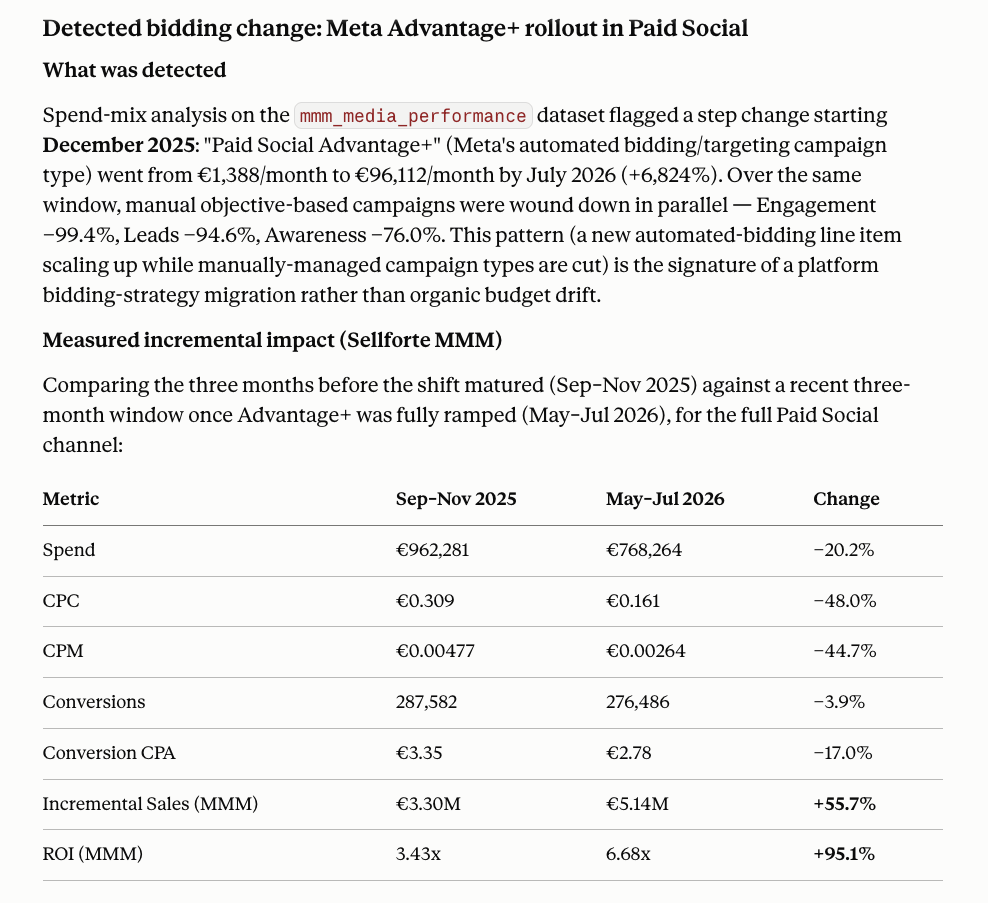
Sellforte MCP to Change Intelligence

Built for AI-First Marketing Workflows

Give AI Access to Sellforte Capabilities

Sellforte MCP is more than a static data feed. It exposes Sellforte capabilities that an LLM can use as tools. The current connector includes capabilities for discovering and retrieving Sellforte data, working with measurement results, creating and accessing optimizer scenarios, and rendering tables and visualizations. The AI does not need to recreate Sellforte’s measurement or planning logic itself. It calls on Sellforte when it needs it.

One Sellforte, Different Ways to Work With It

Sellforte MCP gives you another way to interact with Sellforte and your marketing data.

The Sellforte UI remains the best environment for many workflows, including exploring results, validating findings, understanding response curves, working with experiments, and building plans.

MCP becomes particularly valuable when the workflow starts somewhere else, such as:

  • A CFO changes the budget

  • An analyst needs to combine Sellforte with another dataset

  • A leadership presentation needs to be created

  • An AI agent needs independent measurement before it can make a useful recommendation

Instead of moving every question into Sellforte manually, Sellforte’s measurement and planning capabilities can increasingly come to the workflow.

Sellforte MCP Dynamic Scenario Recommendation

Bring Sellforte Into Your AI Workflows

Sellforte MCP is being rolled out account by account to early users. Join the waitlist to start exploring how Sellforte’s MMM, experiment data, and planning capabilities can become part of your LLM and agent workflows.

Sellforte MCP FAQ

What is Sellforte MCP?

Sellforte MCP allows LLMs and AI agents to access Sellforte’s marketing measurement and planning capabilities through Model Context Protocol. It enables supported AI environments to use Sellforte as part of wider workflows, including analyzing measurement results, accessing experiment data, creating optimizer scenarios, and working with Sellforte alongside other connected sources.

What is MCP?

MCP stands for Model Context Protocol. It provides a standardized way for AI applications to connect to external tools and data sources. Sellforte MCP makes Sellforte one of those connected capabilities.

Which LLMs does Sellforte MCP work with?

Claude is our first working example but Sellforte MCP can be added to any LLM client that supports connecting to MCP servers.

How do I connect Sellforte to Claude?

Add the Sellforte MCP URL as a Custom Connector in Claude and authenticate using your Sellforte account. Once connected, Claude can discover the Sellforte tools available to it and use them when relevant to your requests.

What do I need to start using Sellforte MCP?

Adding the Sellforte MCP server requires a Sellforte subscription with the MMM module, plus an LLM client where you can configure an MCP server yourself or where your organization can add a custom connector for the OAuth-authenticated endpoint we provide.

What can I do with Sellforte MCP?

Current use cases include analyzing Sellforte measurement data, creating tables and visualizations, working with optimizer scenarios, combining Sellforte with other connected data sources, and using Sellforte results as inputs into wider LLM workflows such as presentations and documents.

Can Sellforte MCP combine Sellforte with other data?

Yes. One of the main advantages of using Sellforte through an LLM is that Sellforte can sit alongside other information available to that AI environment. For example, a workflow could use Sellforte measurement together with marketing data provided through another connected source such as Supermetrics.

What is an MMM agent?

An MMM agent is an AI agent that can use marketing measurement and planning capabilities when answering a business question.

For example, when a marketing budget changes, an agent could use Sellforte’s optimizer to create a new scenario, retrieve the recommended allocation, and help explain the expected impact.

Sellforte MCP is an early step toward enabling these kinds of agentic MMM workflows.

Does Sellforte MCP replace the Sellforte UI?

No. MCP adds another way to interact with Sellforte.

The Sellforte product remains important for directly exploring, validating, and working with measurement and planning results. MCP is particularly useful when Sellforte needs to become part of a broader AI workflow.

Does Sellforte MCP automatically change my marketing campaigns?

No. The current MCP use cases focus on accessing Sellforte information and using capabilities such as optimizer scenarios.

How can I get access to Sellforte MCP?

Sellforte MCP is initially being rolled out account by account to early users. Join the waitlist and we’ll be in touch as access expands.

Back to top