
When we launched Dynamic Scenarios, we moved Marketing Mix Modeling beyond historical analysis and into forward-looking planning. Ecommerce, DTC, and retail marketing teams could now simulate budget decisions and see their expected impact on sales before committing a single dollar.
But simulating the right decision is only part of the story.
The other part is actually making it happen.
For performance marketers managing budgets across multiple platforms, even the best recommendation creates work. You read the insight, switch to Google Ads or Meta, find the right campaign, make the change, and hope nothing slips in the process. Every step between insight and action is an opportunity for delay, error, or inaction.
Today, we're closing that gap.
Sellforte Activate lets you apply your MMM-backed recommendations directly to your ad platforms in a single click, without leaving Sellforte.
From Recommendation to Action
Most marketing measurement tools stop at the recommendation.
They surface an insight, maybe suggest a budget shift or a bidding change, and then leave you to act on it yourself. The recommendation lives in one tab. The action happens in another. The connection between the two exists only in your head.
Sellforte Activate changes that.
Now, when Sellforte identifies that a campaign's daily budget should increase or its target ROAS should shift to capture more incremental sales, you don't need to leave the platform to make it happen. You can review the recommendation, understand the reasoning behind it, adjust the value if you want to, and apply it directly to Google Ads from within the Sellforte interface.
The loop between insight and execution is closed.
How Sellforte Activate Works
Sellforte Activate is built into the existing Performance Recommendations module so there's nothing new to learn and no new view to navigate.
When you open your recommendations, you're greeted with a series of cards with each one representing a specific, actionable change across your campaigns.
Each card shows you everything you need to make a decision, including:
- The recommended change (e.g. Decrease Target ROAS for Google Ads_Google Search Generic_DE from 7.70 to 7.22)
- Current bid value
- Recommended bid value
- Spend change as a percentage
- Increase in incremental sales
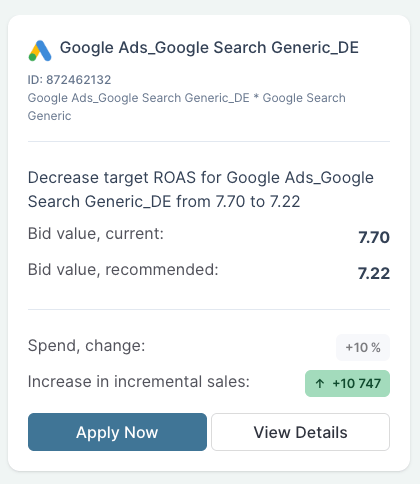
From each card you have two options.
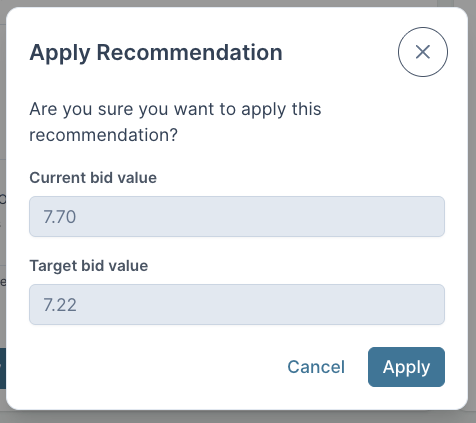
Apply Now opens the confirmation window where you review the current bid value and target bid value before the change is pushed live.
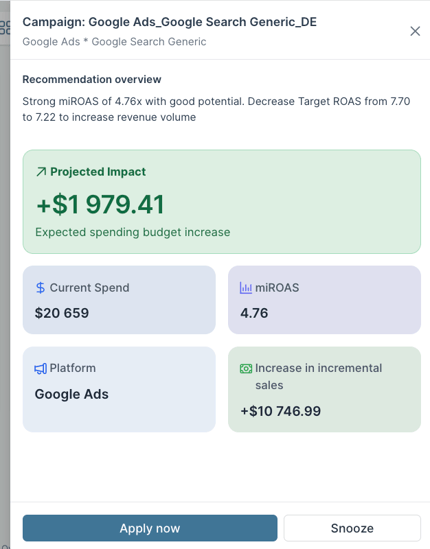
View Details opens a deeper summary. It's a plain-language recommendation overview with projected impact in dollar terms, current spend, miROAS, platform, and forecasted increase in incremental sales. This means you can dig into the reasoning before deciding and there is also a Snooze option if the timing isn't right.
Let's take this Google Search Generic campaign as an example. The recommendation reads, "Strong miROAS of 4.76x with good potential. Decrease Target ROAS from 7.70 to 7.22 to increase revenue volume." The projected impact is +$1,979.41 in additional budget deployed with +$10,746 in incremental sales on the other side of it.
You click "Apply now" and window pops up where you can confirm the current bid value of 7.70 and the target bid value of 7.22. Then just hit "Apply" and the change is live in Google Ads.
Nothing is automatic. Every change requires your confirmation.
Sellforte Activate in Practice
Let's make this concrete.
You're the Head of Performance at a mid-market ecommerce brand. You open Sellforte and four new recommendations are waiting.
Previously, your workflow looked like this: review recommendations, take notes, open each ad platform, locate each campaign, make the change, document what you did, and close the loop manually.
With Sellforte Activate, the workflow becomes: review recommendations, apply.
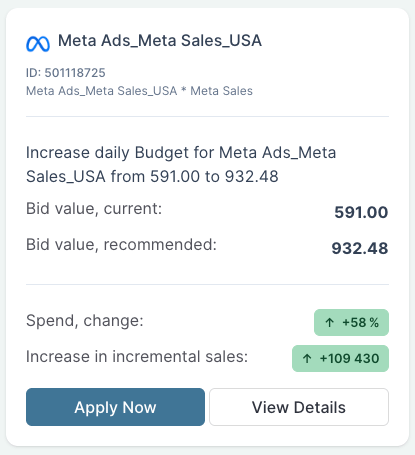
You scan the cards and one immediately stands out: increase daily budget for Meta Ads_Meta Sales_USA from 591.00 to 932.48. This is a +58% spend increase with a miROAS of 8.62 and a projected +109,430 increase in incremental sales. The miROAS is strong and the upside is significant. You click Apply Now and confirm.
In one click, the change is live in Meta.
No platform-switching, no manual entry, and no delay.
Full Visibility Into Every Recommendation
AI-powered optimization tools have a trust problem. Many of them make changes in the background based on logic you cannot inspect, using signals you do not fully understand: a black box that produces outputs without explanation.
The result is fast execution paired with low confidence. Marketers often don't know what the system did or why, which makes it hard to learn from and hard to defend to stakeholders.
Sellforte Activate is built on the opposite principle: complete transparency at every step.
Every card shows the miROAS that drives the recommendation, the current and recommended values side by side, and the projected incremental sales impact of making the change. You are not asked to trust a number, you are shown the reasoning behind it.
You review every recommendation before it's applied. You can edit the recommended value if you want to be more or less aggressive. You confirm the action. Nothing changes without your approval.
This is human-in-the-loop optimization by design.
The model provides the signal. You make the call.
Enterprise-Grade by Design
Sellforte Activate is not a shortcut button. It is a direct API integration with Google Ads, built on the same causal MMM framework that powers everything else in Sellforte.
That means the recommendations being activated are grounded in true incremental impact measurement, not platform-reported metrics, not last-click attribution, and not trend extrapolation. They reflect how your media is actually driving sales, with diminishing returns modeled at the campaign level.
See Sellforte Activate in Action
Sellforte Activate is now live and rolling out to Sellforte customers from today onwards.
There are two ways to explore it.
1. Join our upcoming live event on March 26, where we'll show the first end-to-end agentic MMM workflow that measures, plans, and executes media decisions in real time, including a live demonstration of Activate closing the loop between recommendation and execution.
3. Book a demo and we'll walk you through how Activate works with your campaigns, your channels, and your planning workflow.

The Gap Between Insight and Action Is Closing
Marketing analytics has evolved from static dashboards to conversational insight to forward-looking planning.
Activate is the next step: from planning to execution.
Measure with MMM. Plan with Dynamic Scenarios. Execute with Activate.
The full loop, inside Sellforte.
👉 Save your spot at our live Agentic MMM Masterclass
👉 Book a demo to see it action
Author

Edward Ford is VP of Marketing at Sellforte. He has over 15 years of marketing experience in B2B SaaS and Tech with specialization in marketing measurement and intelligence. Before joining Sellforte, Edward spent over 6 years at Supermetrics where he joined as an early-stage employee.
Introducing Sellforte MCP: Bring Sellforte Into Your AI Workflows

Introducing Sellforte Home: Your mission control for smarter marketing spend