
Prerequisites
- Access: an Amazon Ads login with access to the DSP advertiser. If an agency manages your DSP, the agency can authorize the connection and select only your profiles. Alternatively, they can grant your own user access to the advertiser.
- What Sellforte reads: reporting data only (
AUDIENCE,AUDIO_AND_VIDEO,CAMPAIGN,GEO,INVENTORY,PRODUCT,TECH) for the profiles you select. Sign-in uses Amazon’s standard authorization, so no passwords are shared. Sellforte does not create, edit or pause anything in your account. - Profile type: only Amazon Ads profiles of type agency are supported. DSP campaigns under a seller or vendor profile need our Amazon Ads connector instead.
- Region: know whether your account is hosted in North America (NA), Europe (EU) or Far East (FE). Your agency or Amazon DSP support can confirm this.
1. Log in to Sellforte and navigate to Connectors
- In the left-side navigation pane, select Connectors under Data.
-
From the Available connectors list, click the card for the relevant connector to start the connection.
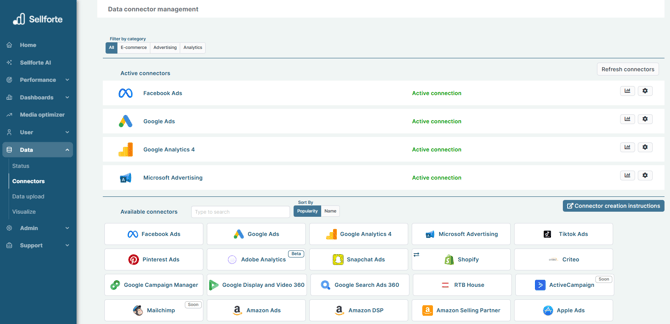
2. Choose API URL, Token URL and Auth grant URL regions
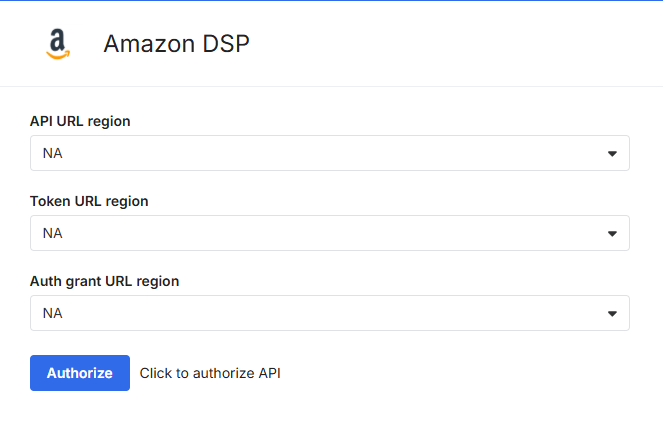
In the API URL region, Token URL region, and Auth grant URL region drop-down menus, select one of the following values based on the region your Amazon DSP account is hosted:
-
If your account is hosted in the North America region, then select NA.
-
If your account is hosted in the Europe region, then select EU.
-
If your account is hosted in the Far East region, then select FE.
You must select the same value in all three drop-down menus.
Click Authorize to allow access your Amazon DSP account using OAuth. You will be redirected to your Amazon DSP account to authorize.
We recommend that you perform the authorization in your browser's Incognito mode.
3. Authorize with your Amazon DSP account
Log in to your Amazon DSP account. Once you have finished, you will be redirected back to the connection form.
4. Choose profiles to sync
In the Profiles field, select the profiles you want to include in your Sellforte model. If you are an agency, select only this client’s profiles.
5. Click "Save & Test" and you are forwarded back to Sellforte
You are ready! 🎉
Amazon DSP is connected and data is fetched automatically with correct MMM schema to Sellforte.