


When we launched Sellforte Activate in March, we closed the loop between MMM insight and ad platform execution for Google Ads. You receive recommendations grounded in real incrementality, which you can apply in a single click without leaving Sellforte.
Today, we’re extending that same workflow to Meta, bringing incrementality-based activation across the channels that matter most for ecommerce, DTC, and retail brands.
Until now, the insight sat in Sellforte while the action happened in Meta Ads Manager. Performance teams had to move between the two, find the right campaign, apply the change manually, and hope nothing slipped along the way.
Now, Sellforte Activate applies MMM-backed budget and bidding recommendations directly to your Meta campaigns, in the same workflow already powering Google Ads.
The Workflow Between Plan and Execution
Performance teams at modern ecommerce and retail brands run a tight measurement layer and the monthly MMM scenarios that shape the media plan tell them which channels deserve more budget, which campaigns are saturated, and where the next dollar or euro belongs.
The plan itself is solid, however, what breaks down is everything that happens between one monthly plan and the next.
Between monthly cycles, campaigns keep running every day, so the plan is monthly while the execution is daily. Performance teams spend their time translating between the two, pulling numbers out of the MMM scenario and retyping them into Google Ads, then switching to Meta Ads Manager and doing it again at ad set level.
The work is tedious and manual and every step between the recommendation and the live campaign carries the risk of something going wrong.
This is the gap between monthly plans and daily campaigns. It's the gap Sellforte Activate was built to close, now across both Google and Meta.
Recommendations at the Right Level for Every Meta Campaign
Whether your Meta Ads strategy is built around CBO, ABO, or a hybrid approach, Sellforte Performance adapts to your optimization structure and delivers recommendations at the exact campaign optimization level. Campaign budget optimization campaigns receive campaign-level recommendations, while ad set-optimized campaigns receive ad set-level recommendations.
Activate then pushes those recommendations through to Meta at the right level, so the changes land where decisions actually get made.
How It Looks: miROAS on Every Card
Sellforte Activate is built into the existing Performance Recommendations module. Open your recommendations and you'll see a grid of cards, each one a specific, actionable change across your Google and Meta campaigns, prioritized by miROAS, impact, or spend.
-1.png?width=1915&height=907&name=image%20(3)-1.png)
Each card now leads with miROAS, the proprietary marginal incremental ROAS metric that grounds every Sellforte recommendation. This is a big update from the earlier card design, which led with the change in spend.
The change in spend is the what. When you click Apply, the system pushes the change through for you. The more useful thing to understand before approving is the why, and the why is miROAS.
Each card surfaces:
- The recommended change
- The campaign's miROAS
- Current and recommended values
- Spend change as a percentage
- Projected increase in incremental sales
From the card, there are two paths:
- Apply Now opens a confirmation window with the values to review before pushing the change live.
- View Details opens a fuller summary with a plain-language recommendation, projected dollar impact, current spend, miROAS, platform, and forecasted incremental sales
Nothing is automatic and every change requires confirmation before it goes live.
Sellforte Activate in Practice
Take an enterprise or mid-market ecommerce brand with media spend split across Google and Meta. The performance team has just finished the monthly MMM refresh and the latest scenarios are live in Sellforte.
When the team opens Performance Recommendations on Monday morning, the cards are sorted by impact, with the highest-priority opportunities at the top.
A Meta Sales campaign in Germany targeting a 1% lookalike audience leads with a +$11,249 scaling opportunity at 12.53x miROAS, recommending a daily budget increase from $1,343 to $2,039. Next to it, a Google Performance Max campaign in Germany shows a +$2,414 incremental sales opportunity at 4.63x miROAS with a recommended Target ROAS adjustment from 9.90 to 9.29.
Not every card is a scaling opportunity. A Meta Prospecting campaign in Germany shows an efficiency improvement, with a −$1,672 daily incremental sales impact and a recommendation to reduce daily budget from $1,568 to $1,221.
The team clicks View Details on the Meta Sales lookalike card for the full breakdown.
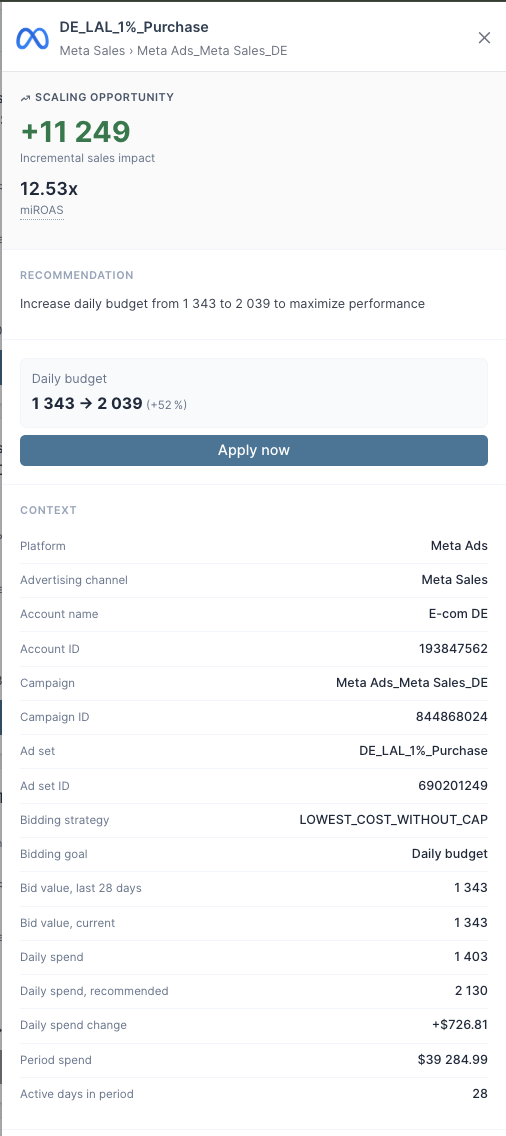
The recommendation reads: Increase daily budget from $1,343 to $2,039 to maximize performance. The team clicks Apply now, confirms the change in the dialog, and the recommendation goes live in Meta.
-1.png?width=579&height=433&name=image%20(6)-1.png)
For teams reviewing many recommendations at once, multi-select makes the cross-platform workflow tangible.
The team can select several cards across Google and Meta, review them together, and push the batch of changes through in a single action, which means the daily reconciliation between MMM signal and live campaigns happens in minutes rather than hours. No screenshots, no retyping, no tab-switching.
-1.png?width=1915&height=913&name=image%20(4)-1.png)
-1.png?width=1918&height=907&name=image%20(5)-1.png)
The Reasoning Behind Every Recommendation
A scaling opportunity card might recommend a $726.81 daily budget increase on a Meta Sales campaign, while an efficiency improvement card might recommend cutting Meta Prospecting spend by $347. Whichever direction the recommendation goes, the question marketers ask before clicking Apply is the same: why this much, and why this campaign?
Activate answers that question on the card itself.
Every recommendation surfaces the miROAS it's built on, the current and recommended values, the spend change, and the projected incremental sales impact. The reasoning isn't buried in a separate explanation layer or hidden behind a model the team can't inspect. It's on the card, next to the action, where the decision is being made.
From there, the team can apply the recommendation as-is or edit the value to be more or less aggressive. The model provides the inputs, and the team makes the call.
Enterprise-Grade by Design
Every recommendation Activate pushes to Meta runs through Sellforte's own native API connector to the Meta Ads platform.
No third-party file pipes, no scheduled batch exports, no intermediate layer between the MMM model and the live campaign. The same is true on the Google side and this is what makes daily activation viable at the cadence performance teams actually work in.
The recommendations themselves are grounded in Sellforte's causal MMM framework. They reflect how media is driving sales in reality, with diminishing returns modeled at the campaign and ad set level on Meta and at the campaign level on Google.
Activate for Meta is available today on request. Current customers can reach out to their customer success manager to discuss enabling it on their account.
One Workflow, Across Your Biggest Ad Platforms
Marketing analytics has moved from static dashboards to forward-looking planning to in-platform execution.
Measure with MMM. Plan with Dynamic Scenarios. Execute with Activate.
With today's release, that execution layer crosses platforms for the first time. Google and Meta together account for the majority of ecommerce media spend, and with Activate live on both, the closed loop between MMM insight and daily campaign execution is no longer a single-platform story.
👉 Book a demo and we'll walk you through how Activate works with your campaigns, your channels, and your planning workflows.
Author

Daria Alén is Senior Marketing Manager at Sellforte, where she builds educational programs, webinars, and events for ecommerce and DTC growth teams. She has over 10 years of marketing experience in B2B SaaS and Tech with specialization in go-to-market strategy and marketing analytics. Follow Daria on LinkedIn for more about marketing and growth.
Introducing Sellforte Activate for TikTok: Measure TikTok's True Incremental Impact and Turn It Into Action
Introducing Sellforte Performance: Turning MMM Into Daily Action