
This guide walks through how to review and apply a bid or budget recommendation from Performance Recommendations directly to Google Ads or Meta, without leaving Sellforte.
Prerequisites
Before you can apply changes, you need Performance Recommendations enabled for your account and an active connection between Sellforte and the ad platform you want to push changes to. Recommendations for Google Ads run at the campaign level, and recommendations for Meta run at the ad set level.
Steps
1. Open Performance Recommendations.
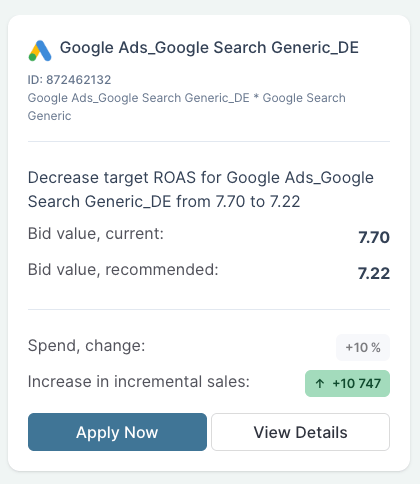
Navigate to the Performance module and open the Recommendations view. Each pending recommendation is shown as a card, with the suggested change in the headline.

2. Review the card.
The card shows the recommended change in plain language, the current bid value, the recommended bid value, the projected spend change as a percentage, and the expected increase in incremental sales. Read these before deciding.
3. (Optional) Open View Details.
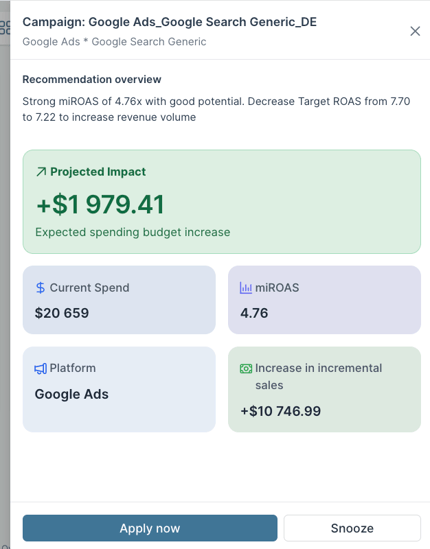
If you want more context before deciding, click View Details. The detail view shows the full reasoning behind the recommendation, including current miROAS, where it sits relative to the optimal bidding range, projected incremental sales in revenue terms, current spend, and platform.
4. Click Apply Now.
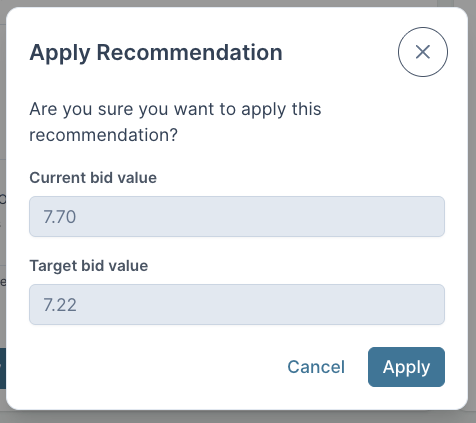
When you are ready to act, click Apply Now on the card. A confirmation window opens, showing the current value and the target value side by side. You can edit the target value here if you want to be more conservative or more aggressive than the recommendation suggests.
5. Confirm the change.
Click Apply in the confirmation window. The change is pushed live to the ad platform through the API connection. You will see the recommendation marked as applied in the Recommendations view.
Result
The bid or budget change is live in your ad platform. Once it has been live long enough to generate signal in your MMM,Change Intelligence will automatically pick it up and evaluate whether the change delivered the projected impact. That evaluation feeds into the next round of recommendations, so the loop between deciding, acting, and learning closes automatically.