
1. Log in to Sellforte and navigate to Connectors
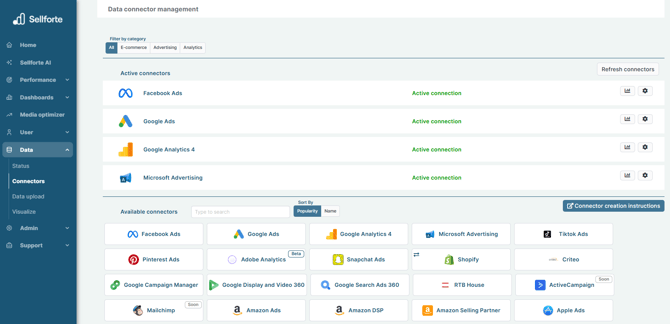
- In the left-side navigation pane, select Connectors under Data.
-
From the Available connectors list, click the card for the relevant connector to start the connection.
2. Add your store name
Give the name of your Shopify store. Shopify store name can be found in the URL, for example "mystore.myshopify.com" or "admin.shopify.com/store/mystore", where mystore is a placeholder for your shop's name.

3. Install Fivetran app in Shopify
In the connection flow, you are redirected to your Shopify store. There you can install Fivetran app for your Shopify store. Click Install.

4. Click Save & Test
When you have installed Fivetran app in your Shopify store, you are able to see green Authentication Succeeded text in the connection flow. Click Save & Test.

You are ready! 🎉
Shopify is connected and data is fetched automatically with correct schema to Sellforte.