Sellforte is a Meta Measurement Partner. In order for us to measure the effectiveness of your Meta activity in the best possible way, it is important that you grant us a partner access to Ad accounts in your Meta Business Portfolio.
In order to grant access, you must have full control of the Business Portfolio. To grant access, follow these steps:
Go to Settings
Go to Business settings in Business Manager or Settings in Meta Business Suite.
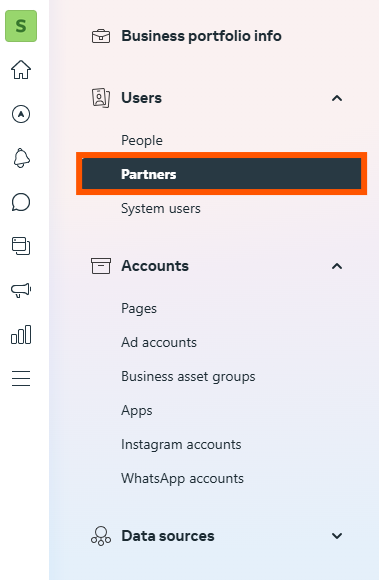
Below Users, select Partners
Click Add and select Give a partner access to your assets

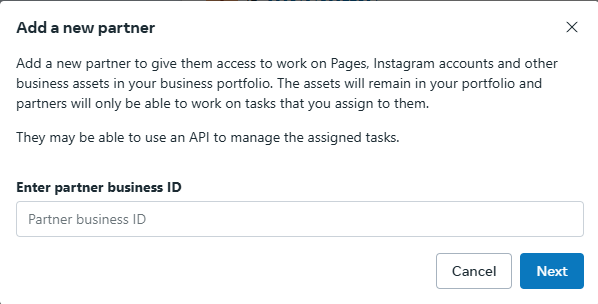
Enter Sellforte business ID and click Next
Your Sellforte contact person will provide you with this ID.
Assign the business assets
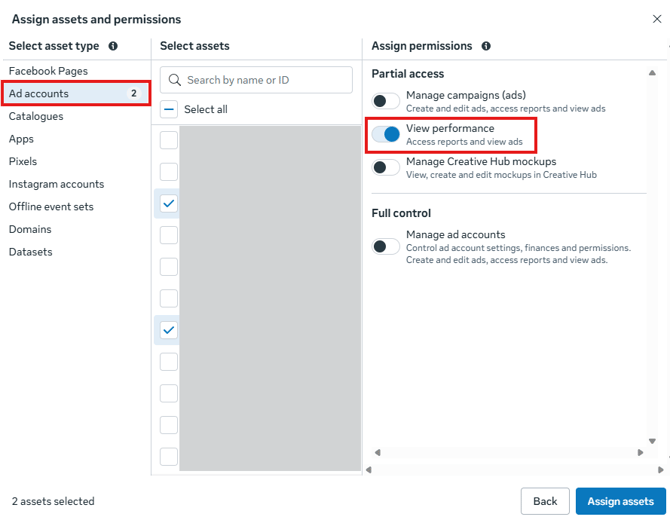
Select the ad accounts to be measured. Sellforte only needs access to relevant ad accounts—not Facebook Pages or other assets.
Check all relevant ad accounts and grant the “View Performance” permission. Then click Assign assets.