
Conversion Lift is fundamentally different from Geo Lift and A/B Test. Rather than running its own analysis, Sellforte ingests the results of a conversion lift study that was designed and executed inside Meta and brings those results into the Sellforte Experiments workflow for visualisation, additional calculations, and centralised reporting.
The experiment itself is run by Meta using its own randomised holdout methodology. Sellforte's role is to process the export, derive an iROAS distribution and credible interval from the reported data, display results in a consistent format, and generate an AI summary.
How Conversion Lift differs from Geo Lift and A/B Test
Geo Lift and A/B Test both use Sellforte's own Bayesian synthetic control methodology to estimate a counterfactual and derive an incremental effect from raw time-series data. Conversion Lift does not. Meta conducts the experiment — a randomised user-level holdout test — and exports the results as a structured summary file. Sellforte reads that file and builds on top of it.
What Sellforte adds on top of the Meta export:
- An iROAS distribution and 90% credible interval derived from the reported sales and spend figures
- A consistent visual presentation of results alongside your Geo Lift and A/B Test experiments
- An AI-generated summary translating the results into a business-readable narrative
- A centralised record in the Experiment Library
The quality and validity of a Conversion Lift result depends on how well the Meta study was designed and executed. Sellforte does not re-run or validate the underlying experiment — it works with the data Meta provides.
When to use Conversion Lift
Use Conversion Lift when:
- You have already run a conversion lift study in Meta
- You have the export file from that study ready to upload
- You want to review and store the result alongside your other Sellforte experiments
- You want an AI summary and consistent reporting format for the Meta result
Conversion Lift is not the right tool for designing or running new incrementality tests. If you want to measure the incremental impact of a Meta campaign and have not yet run a conversion lift study in Meta Ads Manager, you would need to set that up there first.
What you need
To run a Conversion Lift analysis in Sellforte, you provide:
- Ad platform selection: Meta (currently the only supported platform)
- A KPI file containing the raw conversion lift export from Meta, in XLSX format
- Optionally: account, campaign, ad set, or ad IDs to scope the analysis to a specific part of the study
Exporting the conversion lift report from Meta Ads Manager requires access to the relevant Meta account. If you need help obtaining this export, contact your Sellforte team.
The Meta export file
The Meta conversion lift export is an XLSX file structured as a two-column key-value table. Each row contains a field name in column A and its value in column B. Sellforte reads this format directly — no reformatting is needed before uploading.
The file contains study-level metadata and the key measurement fields that Sellforte uses to calculate and display results.
Study metadata
- study_name — name of the Meta conversion lift study
- study_id — unique Meta study identifier
- objective_name — conversion objective, e.g. Purchase - Web
- cell_name — cell label, e.g. Test
Population and reach
- population_test — number of users in the test group
- population_control — number of users in the control group
- population_reached — number of users reached by the campaign
- impressions — total impressions delivered
- spend — total media spend during the study
Conversion metrics
- conversions_test — total conversions in the test group
- conversions_control_scaled — control group conversions scaled to test group size
- conversions_exposed / conversions_notExposed — conversions split by ad exposure
- conversions_incremental — Meta's estimated incremental conversions
- conversions_incremental_lower / _upper — lower and upper bounds of Meta's conversion confidence interval
- conversions_incremental_share — incremental conversions as a share of total test conversions
- conversions_CPiC — cost per incremental conversion
- conversions_confidence — Meta's confidence that the conversion effect is positive
Sales metrics
- sales_test — total sales value in the test group
- sales_control_scaled — control group sales scaled to test group size
- sales_exposed / sales_notExposed — sales split by ad exposure
- sales_incremental — Meta's estimated incremental sales value
- sales_incremental_lower / _upper — lower and upper bounds of the incremental sales confidence interval
- sales_incremental_share — incremental sales as a share of total test sales
- sales_ROAS — Meta's reported return on ad spend for incremental sales
- sales_confidence — Meta's confidence that the sales effect is positive
Sellforte uses the sales_incremental, sales_incremental_lower, sales_incremental_upper, sales_ROAS, and sales_confidence fields as the primary inputs for deriving the iROAS distribution and credible interval shown in the results dashboard. The other fields are used for display and AI summary purposes.
How to create a Conversion Lift experiment
1. Open the Experiments module
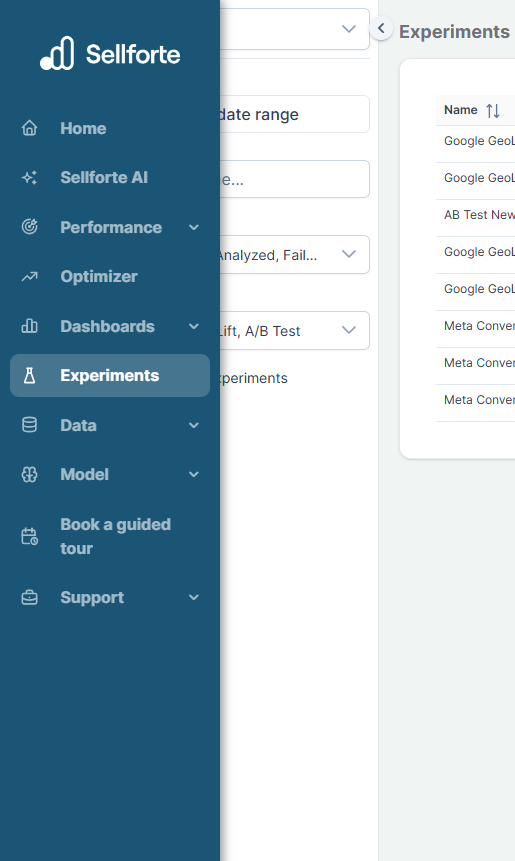
From the left navigation menu, go to Experiments. This opens the Experiment Library.
2. Create a new experiment
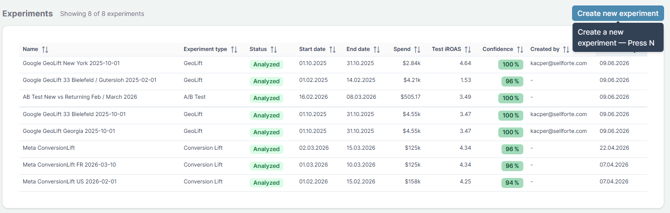
Click Create new experiment and select Conversion Lift as the experiment type.
3. Define the experiment setup
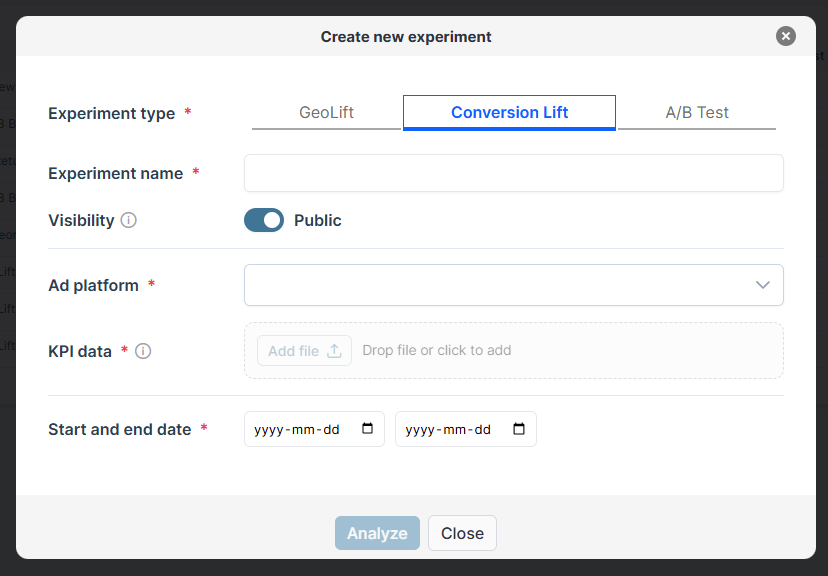
Experiment name — Use a structured naming convention, such as platform + market + date. For example: Meta ConversionLift FR 2026-03-10.
Ad platform — Select Meta. This is currently the only supported platform for Conversion Lift.
KPI file — Upload the conversion lift export from Meta. The platform validates the file automatically and confirms when it is ready.
Optional scoping — If the export covers multiple campaigns or ad sets, you can provide specific account, campaign, ad set, or ad IDs to scope the analysis to the relevant portion of the study.
4. Run the analysis
Click Analyze to generate the result. Sellforte processes the export, calculates the iROAS distribution and credible interval, displays the results in the standard dashboard format, and generates an AI summary.
What the results include
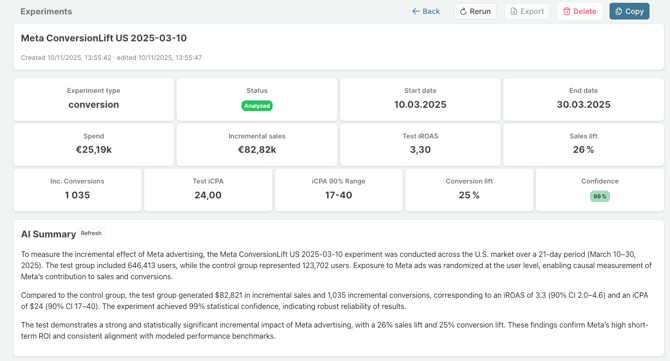
Conversion Lift results are presented in the same dashboard structure as Geo Lift and A/B Test. The headline metrics shown are:
- Spend — total media spend from the Meta study
- Incremental sales — Meta's estimated incremental sales value
- Test iROAS — derived by Sellforte from the reported incremental sales and spend figures
- iROAS 90% CI — derived by Sellforte from the incremental sales lower and upper bounds reported by Meta
- Sales lift — incremental sales as a percentage uplift over the scaled control
- Confidence — Meta's reported confidence that the sales effect is positive
The iROAS distribution chart uses the same 5% HDI / Mean / 95% HDI format as Geo Lift and A/B Test, making results straightforward to compare across experiment types.
An AI summary is generated automatically, covering the study design, the key metrics, and a business-level interpretation of the result.
Results are stored in the Experiment Library alongside all other experiments. The Uploads section shows the file that was used, and the Comments section is available for notes and conclusions.
For a full explanation of each metric, see Sellforte Experiments: How to Read the Results Dashboard. Conversion Lift follows the same structure, with the exception that there are no counterfactual time-series charts — Meta's export provides summary statistics rather than daily time-series data.
Using Conversion Lift results to calibrate MMM
Conversion Lift results can be used to inform MMM calibration in the same way as Geo Lift and A/B Test results — by providing a real-world iROAS anchor for Meta advertising. The same quality criteria apply: only use results from well-designed studies with high confidence.
One consideration worth noting: Meta's conversion lift methodology is based on user-level randomisation within Meta's ecosystem, which differs from the geographic or segment-based designs used in Geo Lift and A/B Test. When using Conversion Lift results for MMM calibration, it is worth being explicit about what the study measured and how the iROAS estimate was derived.
Current platform support
Conversion Lift currently supports Meta (Facebook Ads) only. Support for additional platforms may be added in future.