
Performance Recommendations is the action-oriented half of the Performance module. While Performance Insights shows you what has happened and Change Intelligence shows you what an adjustment actually did, Recommendations tells you what to change next — at the campaign and ad set level, with the projected impact spelled out before you apply anything.

Why bid recommendations need MMM, not platform signals
Ad platforms run sophisticated automated bidding, but they optimise against their own attribution data. That overstates each platform's contribution and ignores what other channels are doing at the same time. The result is bids that chase platform-reported conversions rather than true incremental sales, and a structural pull toward bottom-of-funnel campaigns that happen to sit next to a conversion event.
Performance Recommendations operates on a different signal: Marginal Incremental ROAS (miROAS). Instead of telling you what each campaign earned in the past, miROAS estimates what the next dollar spent in that campaign or ad set is expected to return. That makes it the right metric for deciding where to push spend up, where to pull it back, and where to leave things alone.
What a recommendation looks like
Each recommendation is presented as a card. The card states the suggested change in plain language — for example, decreasing target ROAS on a Google Search campaign from 7.70 to 7.22, or increasing daily budget on a Meta ad set from 591 to 932. Below the headline you see the current bid value, the recommended bid value, the projected spend change in percent and absolute terms, and the expected lift in incremental sales.
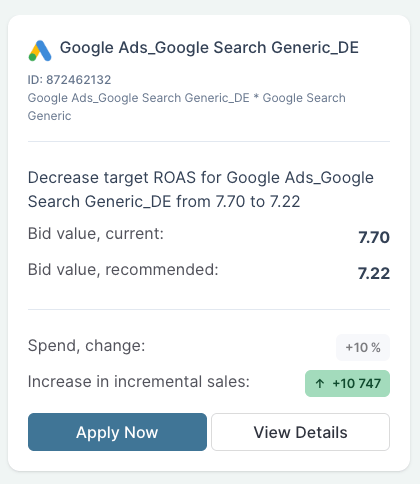
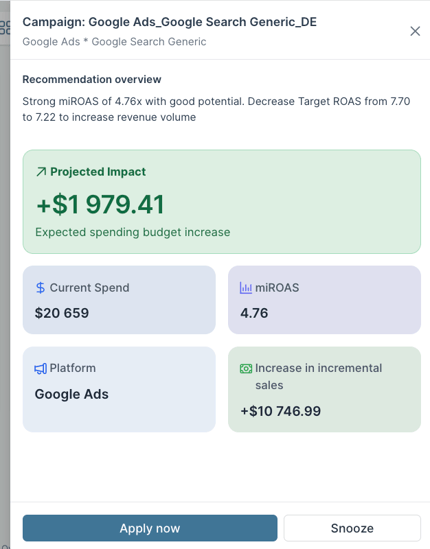
From the card you can either apply the change directly, open a detail view with the full reasoning, or snooze the recommendation if the timing is off. The detail view explains why the recommendation was made: current miROAS, where it sits relative to the optimal bidding range, and what the projected incremental sales impact looks like in revenue terms.
Applying changes from inside Sellforte
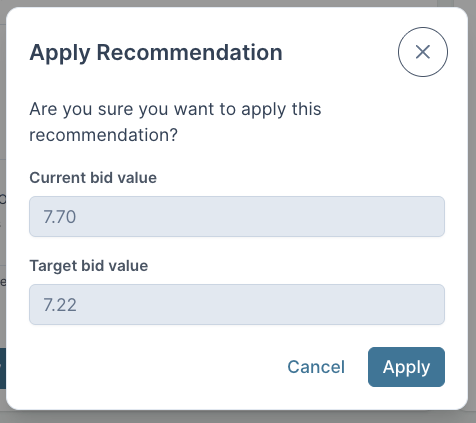
When you decide to act on a recommendation, the change can be pushed live to your ad platform without leaving Sellforte. Recommendations for Google Ads run at the campaign level, and recommendations for Meta run at the ad set level. Each apply step opens a confirmation window where you see the current value and the target value side by side, and nothing is sent to the platform until you confirm.
You can also edit the recommended value before applying it. If you want to be more conservative than Sellforte suggests, lower the target. If you want to push harder, raise it. The recommendation is a starting point, not a fixed instruction.
How Recommendations fits into your workflow
Recommendations sits at the daily and weekly end of the optimisation workflow. The Media Optimizer handles strategic budget allocation across channels, seasons, and markets. Recommendations handles the tactical layer underneath that — the bid and budget moves that happen between strategic refreshes, where most of the day-to-day optimisation work actually takes place.
Once a change has been live in your ad platform for long enough to generate a signal, Change Intelligence picks it up and evaluates whether it delivered the expected result. That feedback then improves the next round of recommendations, which is how Performance becomes a closed loop rather than a one-way recommendation feed.
Data requirements
To generate bid and budget recommendations, Sellforte needs your media data flowing in through the standard connectors, the campaigns and ad sets you want to optimise covered by the model, and an active connection to the ad platforms you want to apply changes to. The same data pipelines that power your MMM results are what feed the recommendation engine — there is no separate setup beyond enabling the platforms you want Sellforte to act on.